Learn · Setup guides
Connect Instantly API to Outloop
Last updated:
In short
Connect the Instantly API without exposing your API key to your agents.
Outloop lets your agents use approved Instantly (instantly.ai) API access through a secure local bridge. You create a scoped Instantly v2 API key and store it in Outloop — the key stays in your local secret store (macOS Keychain), and agents call the Instantly API through Outloop without ever seeing the raw key.
What this setup gives you
Agents that run cold-email work in Instantly — reading campaigns and accounts, pulling
analytics, or building lead lists — usually get a raw API key pasted into a tool, a chat, or a
.env file. With Outloop, the v2 API
key stays in your local secret store and the agent requests the action through the API Bridge
instead, so it never sees the raw key. The credential is used on the wire host-side; the agent
uses its capability without ever seeing its value.
.env files, project folders, or
generated artifacts. The key's only destination is the Outloop API key field.
What you need before starting
- ✓An Instantly account with API access (Settings → Integrations → API).
- ✓Permission to create a v2 API key and choose its scopes.
- ✓Outloop installed locally, with access to your macOS login Keychain.
- ✓A client workspace connected in Outloop.
1. Confirm your account and open Settings
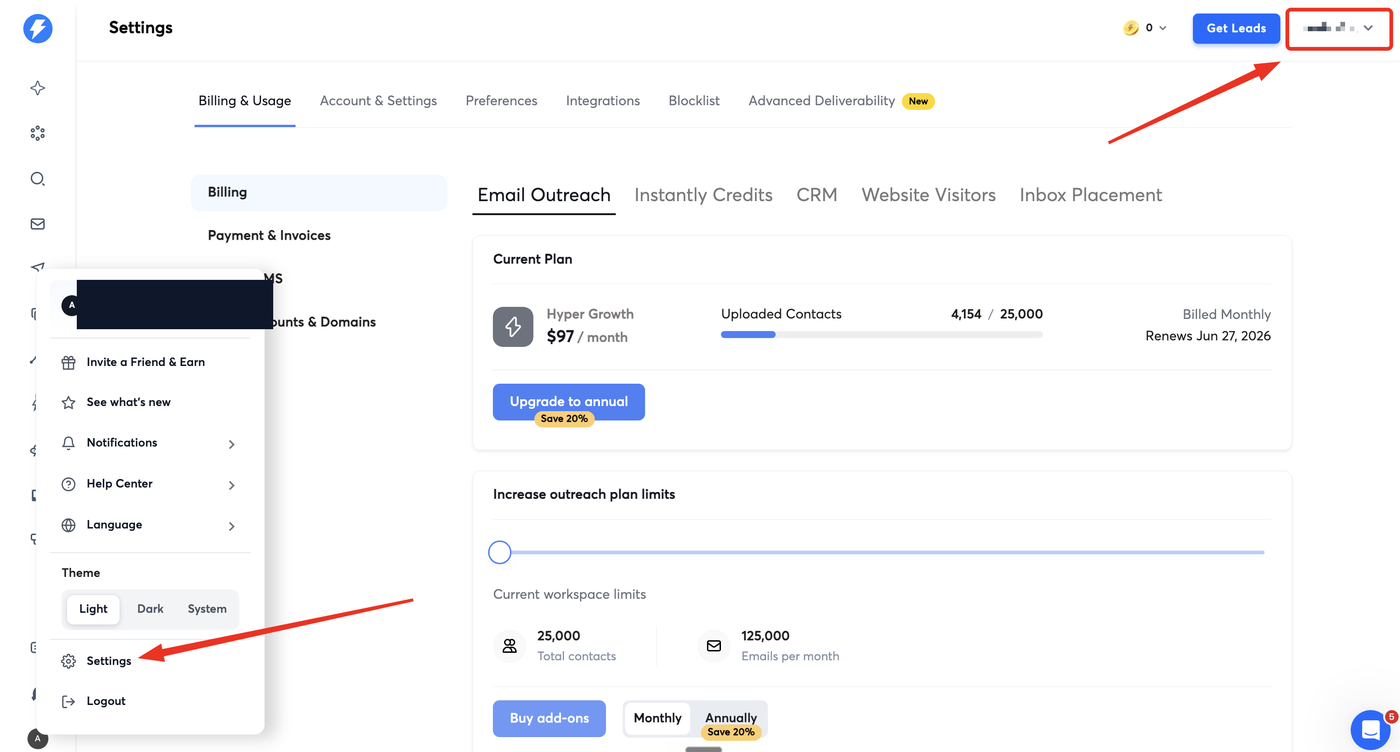
If you manage multiple Instantly accounts, first make sure you are in the right one (top-right account switcher). Then open the account menu and click Settings.
2. Integrations → API Keys → Create
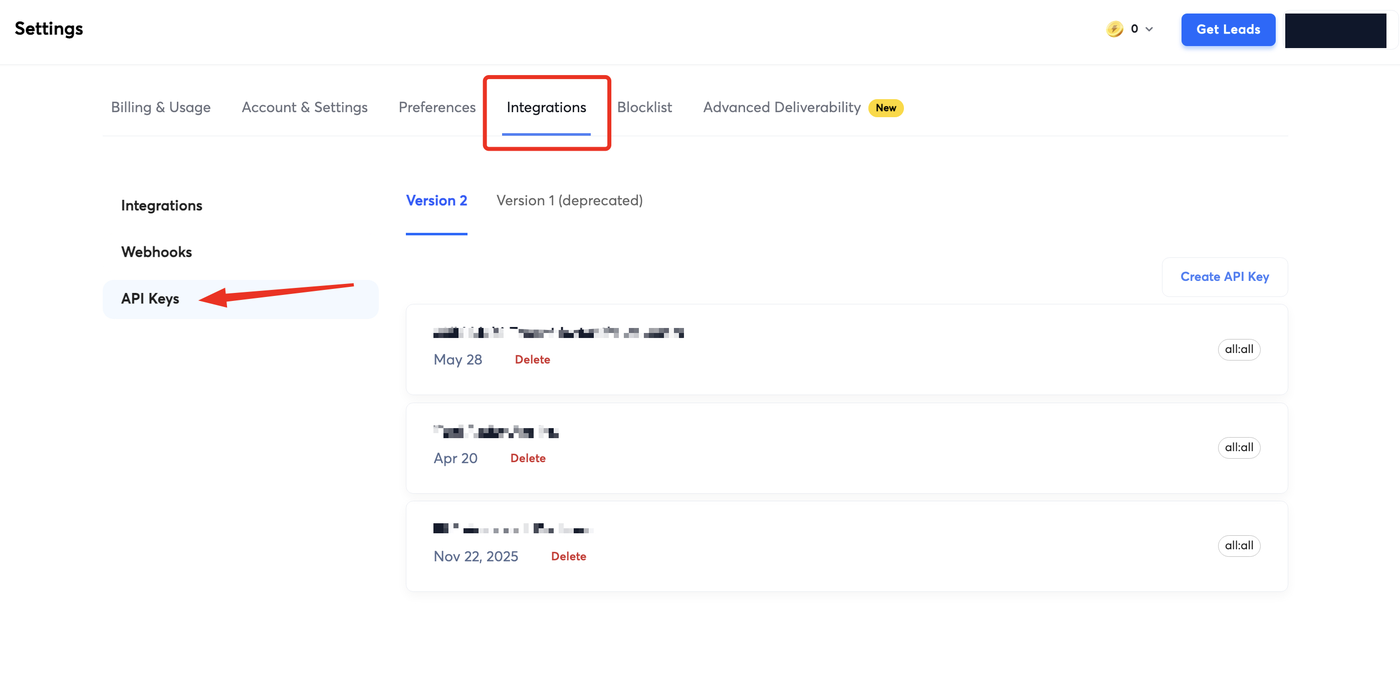
Open the Integrations tab, select API Keys, and stay on Version 2 (Version 1 is deprecated). Click Create API Key.
3. Name the key and choose scopes
Give the key an identifiable name — match the name Outloop suggests so the same key is easy to
recognize on both sides. Then choose scopes. Instantly v2
keys are scoped per resource and action (for example campaigns:read,
leads:create). Selecting
all:all grants full access to every endpoint.
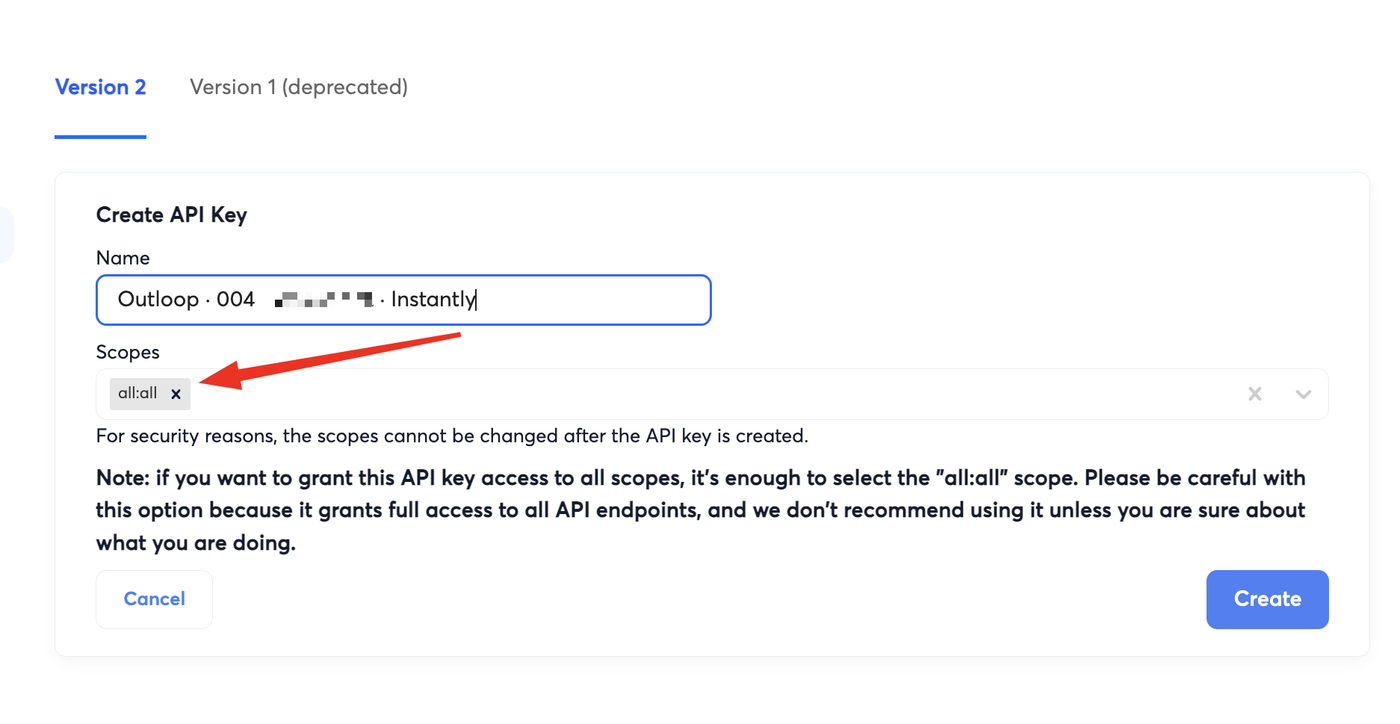
all:all grants full access — pick the minimum the agent needs.
For a read-only proof, an all:read key is enough; you can mint a
separate write key later.
4. Add the Instantly key in Outloop
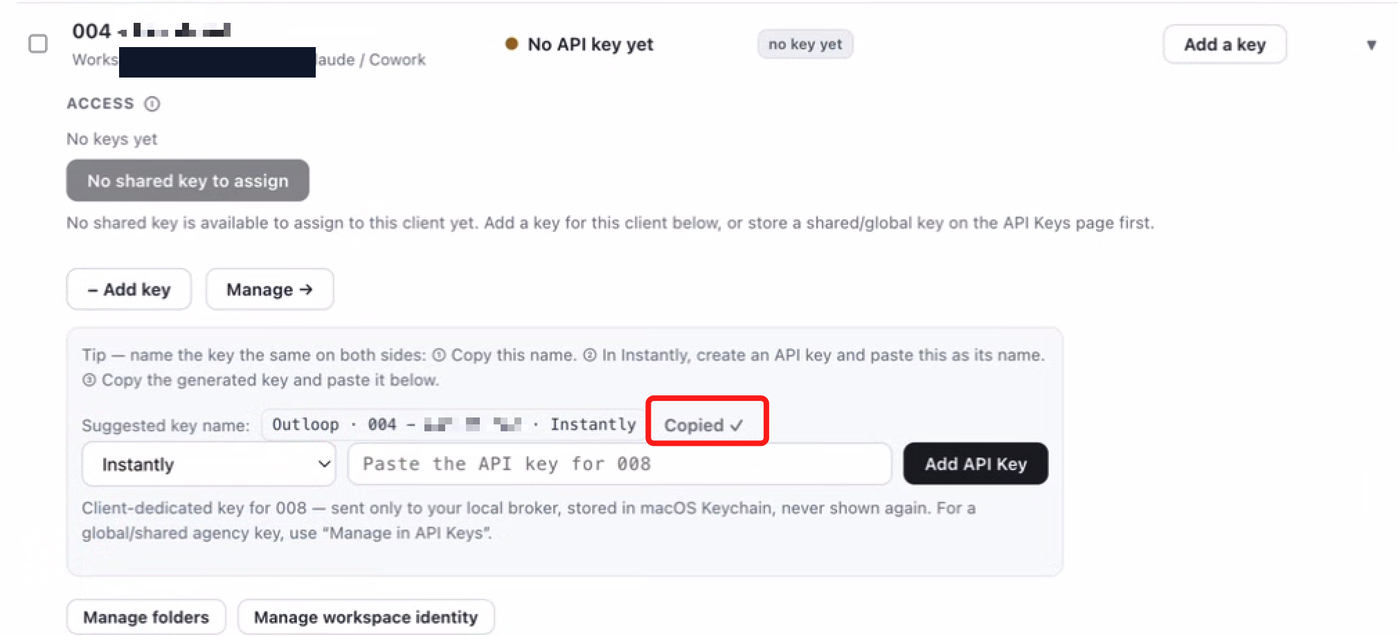
In Outloop, choose Instantly and pick the client workspace that should get access. Outloop suggests a key name — copy it so you can name the key the same on both sides. Paste the Instantly key into the API key field and add it; Outloop stores it in macOS Keychain for that client workspace and never shows it again.
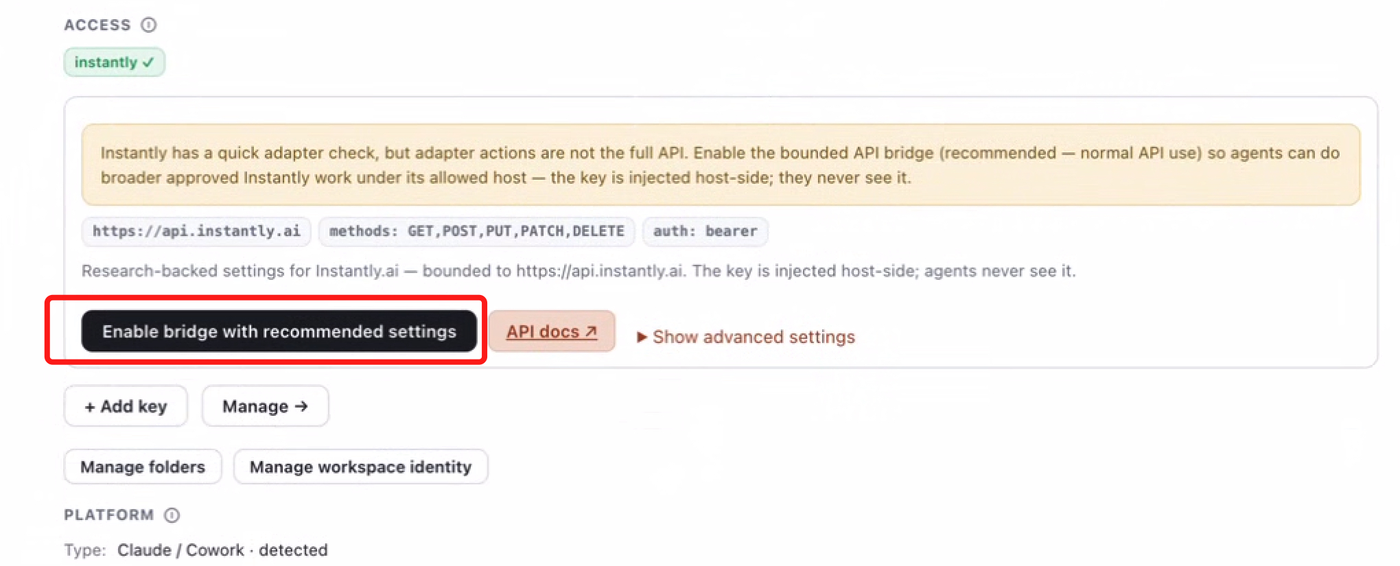
5. Enable the bounded API bridge
Instantly has a quick adapter check, but adapter actions are not the full API. Click
Enable bridge with recommended settings so agents can do
broader approved Instantly work under its allowed host. The bridge is bounded to
https://api.instantly.ai with Bearer
auth, and the key is injected host-side — agents never see it.
6. Allow Keychain access
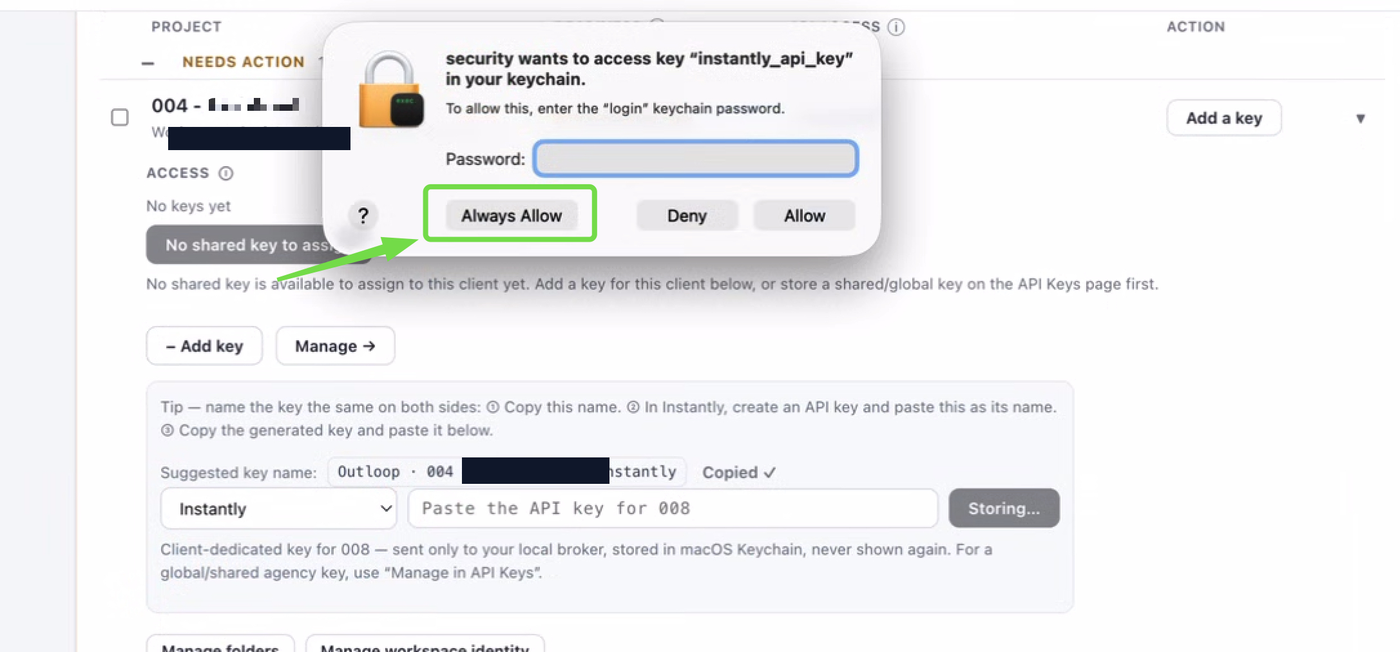
The first time the broker reads the key, macOS asks for permission to access
instantly_api_key in your Keychain.
Enter your login Keychain password and click
Always Allow so the prompt does not appear on every run.
7. First safe proof (read-only)
Always prove access with a read first. Copy the test prompt from the Instantly key row and run it in your agent. The safe proof calls:
GET /api/v2/workspaces/current
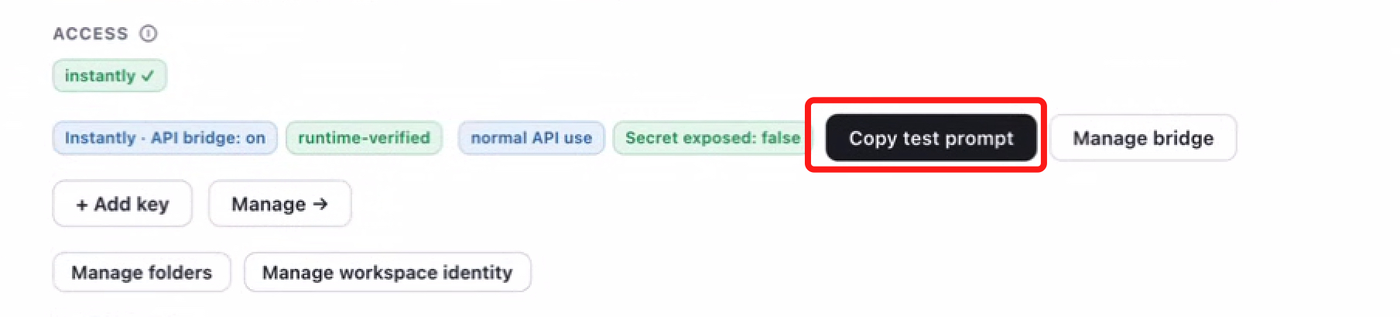
Paste the prompt into your agent and wait for the result.
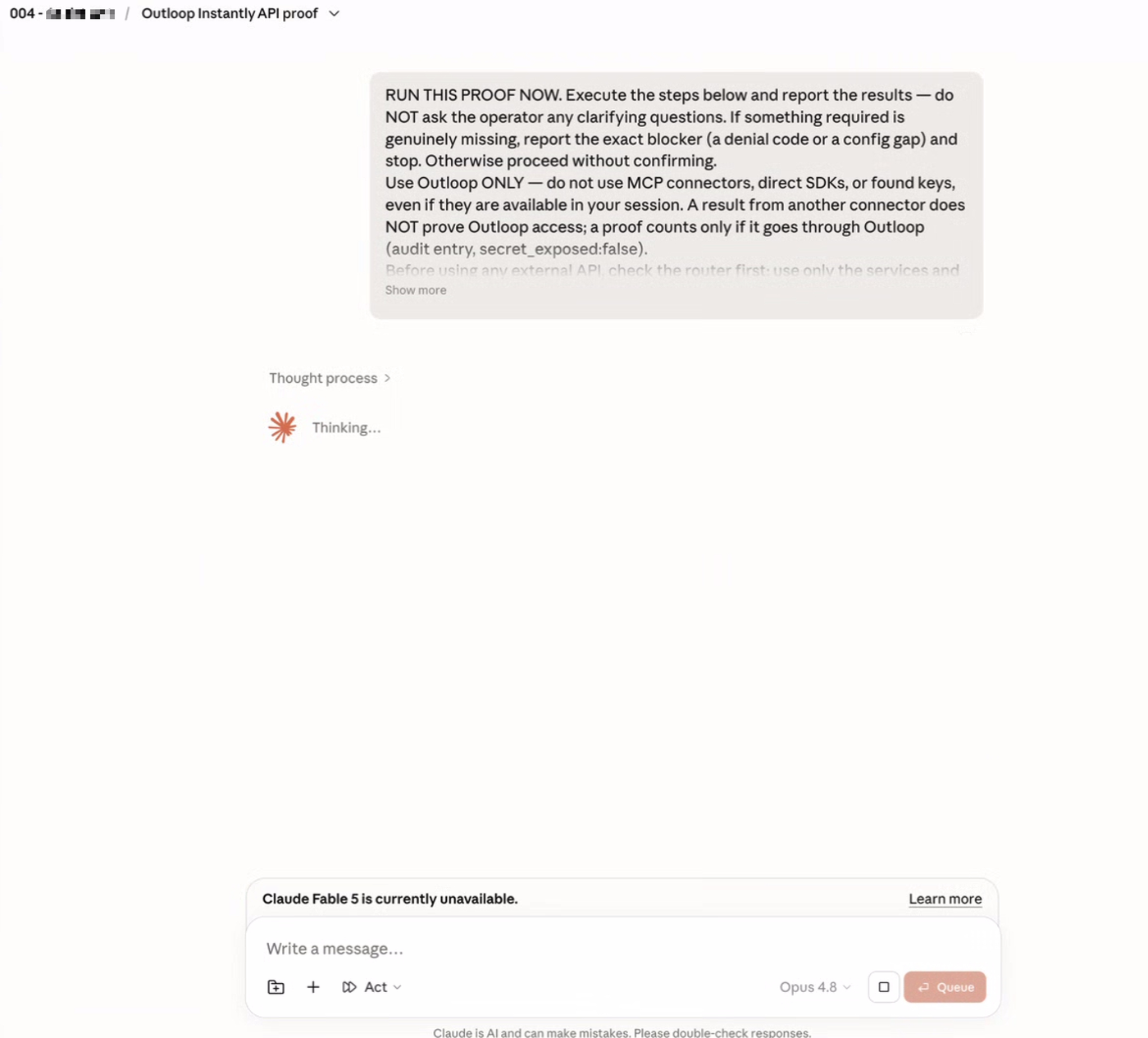
A successful, verified Outloop proof looks like this:
Outloop Instantly proof — SUCCESS
GET /api/v2/workspaces/current
HTTP 200
decision: allow / OK
secret_exposed: false
runtime_verified: yes
audit entry present
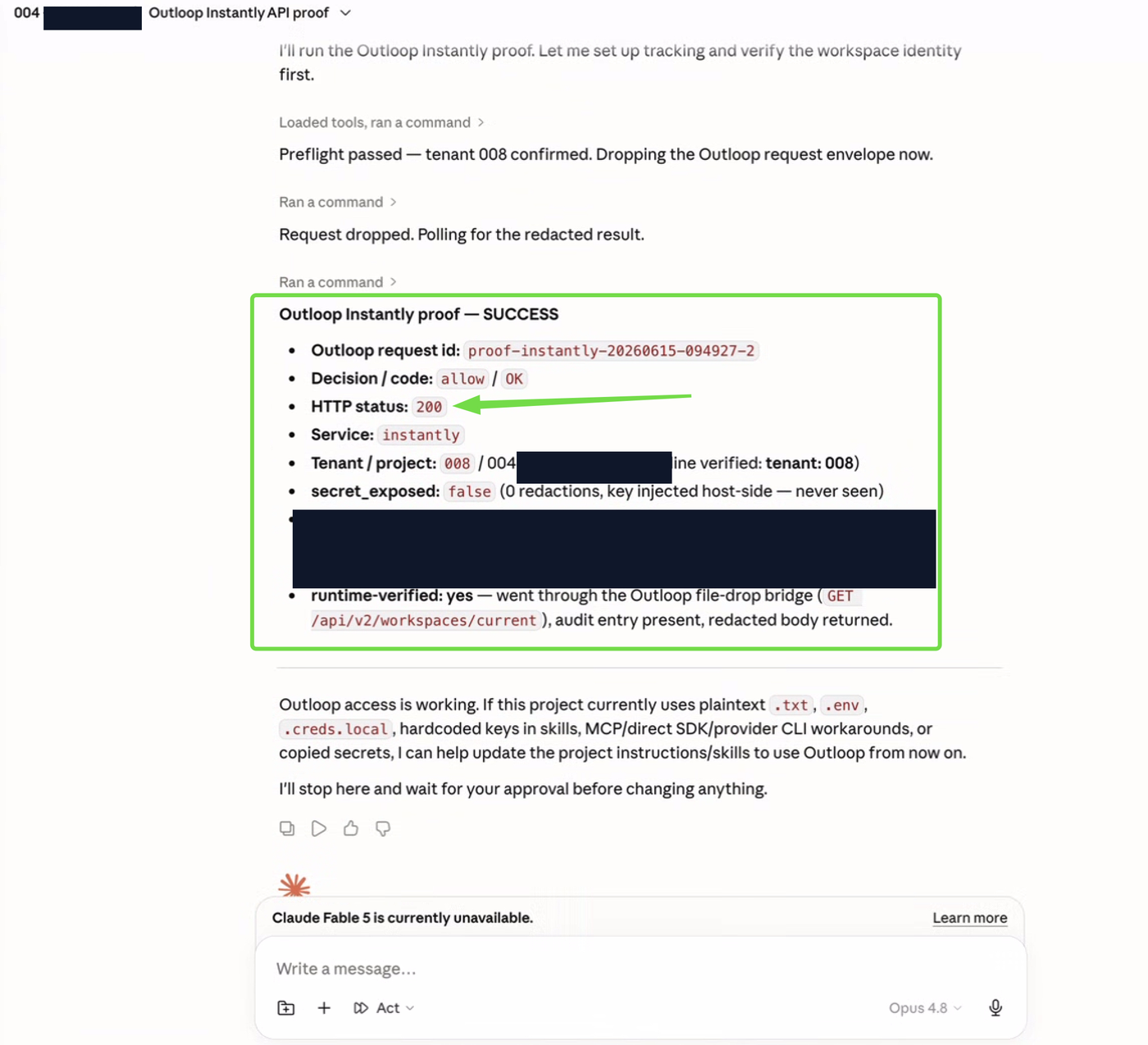
We use GET /api/v2/workspaces/current
for the first proof because it confirms access without changing any Instantly data.
8. What the Instantly API can do
The first proof is read-only, but the integration is not limited to reads. The Instantly API (v2) covers a broad surface. Common reads include:
GET /api/v2/workspaces/current   — the current workspace (the safe proof)
GET /api/v2/campaigns            — list campaigns
GET /api/v2/accounts             — list sending email accounts
GET /api/v2/emails               — list messages (unibox)
GET /api/v2/campaigns/analytics  — campaign analytics
limit
+ starting_after; pass the returned
next_starting_after). Rate limits are 100 requests/second and
6,000/minute, shared across the whole workspace — extra keys do not raise the ceiling.
Build only on v2.
9. Write actions and the safe next proof
Instantly also supports write actions, and the Outloop bridge can route approved POST/PATCH requests when the workspace policy allows them. Notable writes:
POST /api/v2/lead-lists   — create a lead list (safe: empty, deletable)
POST /api/v2/campaigns    — create a campaign (draft sends nothing)
POST /api/v2/leads        — create a lead
POST /api/v2/emails/test  — send a test email
The safest write to test first is POST /api/v2/lead-lists:
it creates an empty, self-contained lead list, sends no email, and is trivially deleted with
DELETE /api/v2/lead-lists/<id>.
10. Verified vs not claimed yet
To keep this honest, here is exactly what is proven and what is not:
- Verified Instantly read access through Outloop:
GET /api/v2/workspaces/currentreturned HTTP 200 with decision allow, an audit entry, andsecret_exposed: false. - Supported, not verified yet Instantly write actions (for example
POST /api/v2/lead-lists): supported by the API and permitted through bridge policy, but not yet runtime-verified in this guide. - Not connected here The official Instantly MCP: it exists, but it is not connected or verified in this workspace.
secret_exposed: false, and an audit entry.
11. Instantly API Bridge vs Instantly MCP
Instantly offers both an API and an official MCP. In this workspace, the live, verified path is the Instantly API through Outloop. The API through Outloop is usually more stable, auditable, tenant-scoped, and governable; an MCP can be useful, but we only mark it verified when it is actually connected and tested here — and it is not.
| Area | Instantly API through Outloop | Instantly MCP |
|---|---|---|
| Live in this workspace | Live now The API path is the only Instantly path connected here. | Not connected here An official MCP exists at mcp.instantly.ai/mcp, but it is not connected in this workspace. |
| Verified in this guide | Verified in this guide Proven with a real Outloop read proof. | Not verified here |
| Auth model | API v2 key stored in Outloop / macOS Keychain, injected host-side as a Bearer token. | Your Instantly API key over HTTPS; the MCP inherits that key’s scopes. |
| Raw secret exposure to the agent | Secret-safe Outloop keeps the raw key out of chat, files, and agent context. | The connector holds the API key in its session. |
| Audit trail | Audited Every API Bridge request is auditable through Outloop. | Not through Outloop. |
| Workspace / tenant routing | Workspace-scoped Outloop enforces per-client workspace boundaries. | Not through Outloop. |
| Read actions | Verified GET /api/v2/workspaces/current proven live here. | Not verified here |
| Write actions | Supported, not verified yet Bridge permits POST/PATCH; not runtime-verified until a safe write proof succeeds. | Likely supported 31 official tools include writes, but nothing is verified here. |
| API surface | The full documented Instantly v2 REST surface. | A curated tool set (31 tools across 5 categories). |
| Stability | Predictable key-based access. | Can depend on connector/session state. |
| Best fit | Governed, repeatable client and workspace workflows. | Convenience when a connected MCP is already working. |
12. Troubleshooting
If the proof fails, check:
- →The key is a Version 2 key (a v1 key returns 401 on v2 endpoints).
- →The key has a scope that allows the request — a 401 means an invalid key, a 403 means the key is valid but lacks the needed scope (try
GET /api/v2/campaigns?limit=1if the key is narrowly scoped). - →You clicked Always Allow on the Keychain prompt.
- →The request path is under
https://api.instantly.aiand you did not send your own Authorization header — Outloop injects it host-side. - →The workspace in Outloop is the correct one for this client.
secret_exposed: false.
Outloop is in commercial beta (controlled design-partner prep). Outloop is an independent tool and is not affiliated with or endorsed by Instantly. See the security model, or the Calendly API setup guide.
Once the read proof succeeds, your agent can use the Instantly API through Outloop — without seeing the raw key.
Outloop is accepting qualified AI agencies, operators, and dev shops into commercial beta.