Learn · Setup guides
Meta Marketing API App Review: approval checklist
Last updated:
In short
Meta App Review for the Marketing API is where Meta checks your app, business, data handling, and requested permissions against its platform requirements before granting higher Marketing API access. It is separate from connecting a token to Outloop.
Connecting Meta Ads access to Outloop proves the runtime path on your own business assets. App Review proves to Meta that your app settings, data handling, reviewer instructions, and use case follow Meta's rules. Submit a narrow, accurate use case, and never claim approval before Meta grants it.
Approval is separate from connecting a token
Connecting Meta Ads API access to Outloop proves the runtime path. App Review proves to Meta that your app, business, data handling, and requested permissions follow Meta's platform requirements. They are two different jobs, done at different times.
Already setting up the token? Start with the Connect Meta Ads API to Outloop guide for local setup and a safe read-only proof, then come back here for the approval submission.
What this approval is for
Marketing API Access Tier review covers authorized ad account workflows, including:
- ✓Agency or internal business usage
- ✓Reporting
- ✓Campaign structure review
- ✓Budget checks
- ✓Campaign creation or updates, if requested and approved
Use a narrow, accurate use case. Do not describe the app as unrestricted AI ad automation. Describe it as authorized Meta Marketing API access for business and ad accounts the user is permitted to manage.
Before you start
Confirm each of these before opening the review submission:
- ✓Meta app created
- ✓Business Portfolio connected
- ✓Business verification complete if required
- ✓App icon uploaded
- ✓App domain set to
outloop.co - ✓Privacy policy URL exists
- ✓Terms URL exists
- ✓Data deletion URL exists
- ✓Website platform added
- ✓Reviewer instructions prepared
- ✓No raw access tokens in screenshots or videos
App settings
Copy these values into the matching App Settings fields:
App domains
outloop.co
Privacy Policy URL
https://outloop.co/privacy
Terms of Service URL
https://outloop.co/terms
User Data Deletion
Data deletion instructions URL
Data deletion URL
https://outloop.co/data-deletion
Category
Business and pages
Contact email: prefer a business contact email. If needed, use the account email already accepted by Meta.
DPO: leave blank unless the company has formally appointed a Data Protection Officer. Do not invent a DPO. If Meta requires a contact, use a privacy contact and do not label it as a formal DPO unless that is legally true.
Add platform: Website
Add the Website platform, then set the site URL and add or update website testing instructions.
Site URL
https://outloop.co/
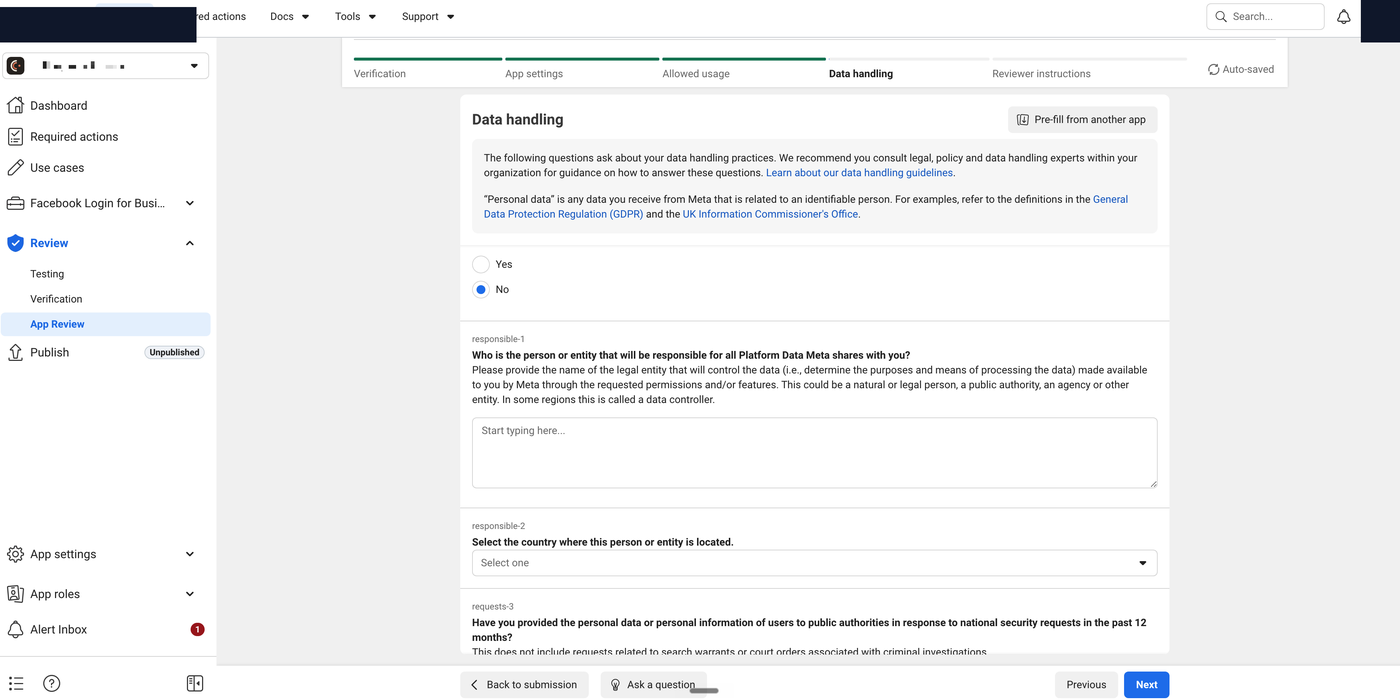
Data handling
If Meta Platform Data may be processed by an AI model provider during an authorized workflow, answer Yes to processors, then declare the processor accurately.
Processor
Anthropic PBC
Processor category
IT solutions and services, including cloud storage and processing
Countries: use the countries shown in the provider's public data processing / server information. Avoid inventing countries.
Data controller / responsible entity
ARGAMAN X MEDIA LTD
Country
Israel
National security requests: if true, select No.
Public authority request policies: select the policies the company actually maintains or is adopting — do not select "None of the above" if these processes exist:
- ✓Required review of the legality of these requests
- ✓Provisions for challenging these requests if they are considered unlawful
- ✓Data minimization policy
- ✓Documentation of these requests, including responses and legal reasoning
Reviewer instructions
Provide separated copy blocks. The example values below are from our own public submission — replace the entity name, app name, and contact with your own.
Where can we find the app?
https://outloop.co
Provide instructions for accessing the app
Outloop Ads Access is used by ARGAMAN X MEDIA LTD for authorized Meta Marketing API workflows on ad accounts we are authorized to manage.

Please review these public pages:

Website: https://outloop.co
Privacy Policy: https://outloop.co/privacy
Terms: https://outloop.co/terms
Data Deletion Instructions: https://outloop.co/data-deletion

The submitted use case is Meta Marketing API access for advertising workflows, including ad account review, reporting, campaign structure review, budget checks, and approved campaign operations.

We use Meta/Facebook authorization only for authorized business and advertising account access. We do not use Facebook Login to collect consumer social profile data such as friends, birthday, gender, or similar personal profile information.

Outloop does not sell Meta Platform Data, does not use it for data brokerage, and does not use it for unrelated advertising targeting.

Meta API access is used only for ad accounts connected to our authorized business or client workflows.
If payment or membership is required
No payment or membership is required to review the public website, privacy policy, terms, and data deletion page.

The full runtime product is a controlled local macOS workflow for authorized business users. If Meta requires a guided review or demo access, please contact support@outloop.co and we will provide a reviewer walkthrough or temporary test access.
If payment is required to download this app
No payment is required to access the public website.

The app is not distributed through an app store, so gift codes are not applicable.
Geographic restrictions
There are no geographic restrictions or geo-blocking for https://outloop.co.
Facebook Login integrated: No — the website does not use Facebook Login.
Supporting documentation
Supporting documentation is optional, but useful if it is clean. A short walkthrough video can:
- ✓Show the public website
- ✓Show the privacy, terms, and data deletion pages
- ✓Show the Meta Ads workflow purpose
- ✓Show Outloop using the Meta Marketing API for an authorized ad account
- ✓Show no token in the UI, no Authorization header, and
secret_exposed:false - ✓Show the audit / result proof if available
Do not show the app secret, access tokens, client secrets, Authorization headers, or private customer data in any screenshot or video.
After you submit
After submitting, status may show Review in progress, and the request may list Marketing API Access Tier. Recommended follow-up:
- ✓Monitor Required actions
- ✓Monitor the Alert Inbox
- ✓Respond quickly to reviewer questions
- ✓Do not change app settings during review unless requested
- ✓Keep the privacy, terms, and data deletion pages live
- ✓Preserve screenshots / video proof in case Meta asks for more detail
What not to do
- ✕Do not show the app secret
- ✕Do not paste access tokens into docs, screenshots, email, or chat
- ✕Do not claim approval before Meta approves
- ✕Do not describe the product as unrestricted AI ad automation
- ✕Do not say Facebook Login is integrated if the website does not use it
- ✕Do not list processors that do not receive Meta Platform Data
- ✕Do not invent a Data Protection Officer
- ✕Do not use a dead data deletion URL
Related: Connect Meta Ads API to Outloop · Data Deletion Request · Privacy Policy · Terms of Service.
Outloop is in commercial beta (controlled design-partner prep). Outloop is an independent tool and is not affiliated with or endorsed by Meta. App Review outcomes are decided by Meta; this guide does not guarantee approval. See the security model.
Run Meta Ads agents without handing over tokens.
Outloop is accepting qualified AI agencies, operators, and dev shops into commercial beta.