Guides · Setup
Connect Taboola Backstage / Realize API to Outloop
Last updated:
In short
Outloop connects Taboola Backstage to your AI agents using OAuth client credentials stored in your Mac's Keychain.
Agents run real campaign reads and writes under one mapped advertiser; the client secret is never shown to the agent, the chat, your project files or your logs. Each workspace is bounded to a single client account, and any other account is refused before Taboola is contacted.
The two account IDs, and who translates them
Taboola gives every account two different identifiers for the same account, and knowing which is which explains both the setup step below and the single most confusing error this connector can produce.
| Identifier | Example shape | Where it appears |
|---|---|---|
numeric id | 1234567 | The Realize interface and the accountId= URL parameter |
alphabetic account_id | taboola-demo-advertiser | Every Backstage account-scoped API path |
Every account-scoped Backstage call is addressed by the alphabetic
one, because the account is the first path segment of the request. The number you can see in
Realize is not a valid substitute there — Backstage simply does not recognise it, and answers
404 api.action.resource_not_found with the message
account, which reads like a permissions problem and is not one.
The good news is that Outloop resolves this for you. Find my Taboola accounts asks Taboola which accounts your credential may use and pins the one you choose, in its API form. The dashboard says so itself: picking from that list means you never have to translate between the two identifiers.
account_id, and entering the numeric Realize ID there saves without any
error or warning before failing on every call. If a connector that looked fine starts returning
404 api.action.resource_not_found, check the identifier shape before you
contact Taboola about permissions.
What this connection gives you
Outloop lets an approved AI worker use the Taboola Backstage API without ever seeing the Taboola credential. The OAuth client ID and client secret sit in the macOS Keychain on the Mac that runs your agents. When an agent makes a request, Outloop mints the access token host-side, puts the credential on the wire, calls Taboola, and returns a redacted response.
Once a workspace is configured, approved work runs without a per-request approval. Reads and writes under the mapped advertiser execute directly. Outloop is the policy and runtime layer — not a queue somebody has to sit in front of.
- ✓Read campaigns, items and reporting under one client advertiser.
- ✓Create, update and rename campaigns; pause and resume without touching a destructive switch.
- ✓One agency credential serving many client workspaces, each bounded to its own account.
- ✓The agency network account refused by policy, recognised under both its identifiers.
- ✓A redacted audit line for every attempt, carrying
secret_exposed: false.
What you need
- ✓Outloop installed on macOS 13 or later (Apple Silicon).
- ✓Backstage API access granted for your partner account, obtained from your Taboola account manager. A missing API client is an account permission on Taboola's side, not an Outloop problem.
- ✓Your Backstage Client ID and Client Secret.
- ✓The client advertiser you want this workspace to work in, open in Taboola Realize.
1. Add Taboola Backstage in Outloop
In Outloop open API Keys & Access and add Taboola Backstage.
2. Enter the Client ID and Client Secret
Taboola Backstage uses OAuth 2.0 client credentials, so there are exactly two values: Client ID (not secret — it identifies the API client) and Client Secret. The secret goes straight to the macOS Keychain over loopback and is never displayed again.
There is no access token to paste. Backstage tokens expire after 12 hours and nothing would renew a pasted one, so Outloop mints them itself from the client pair on every use.
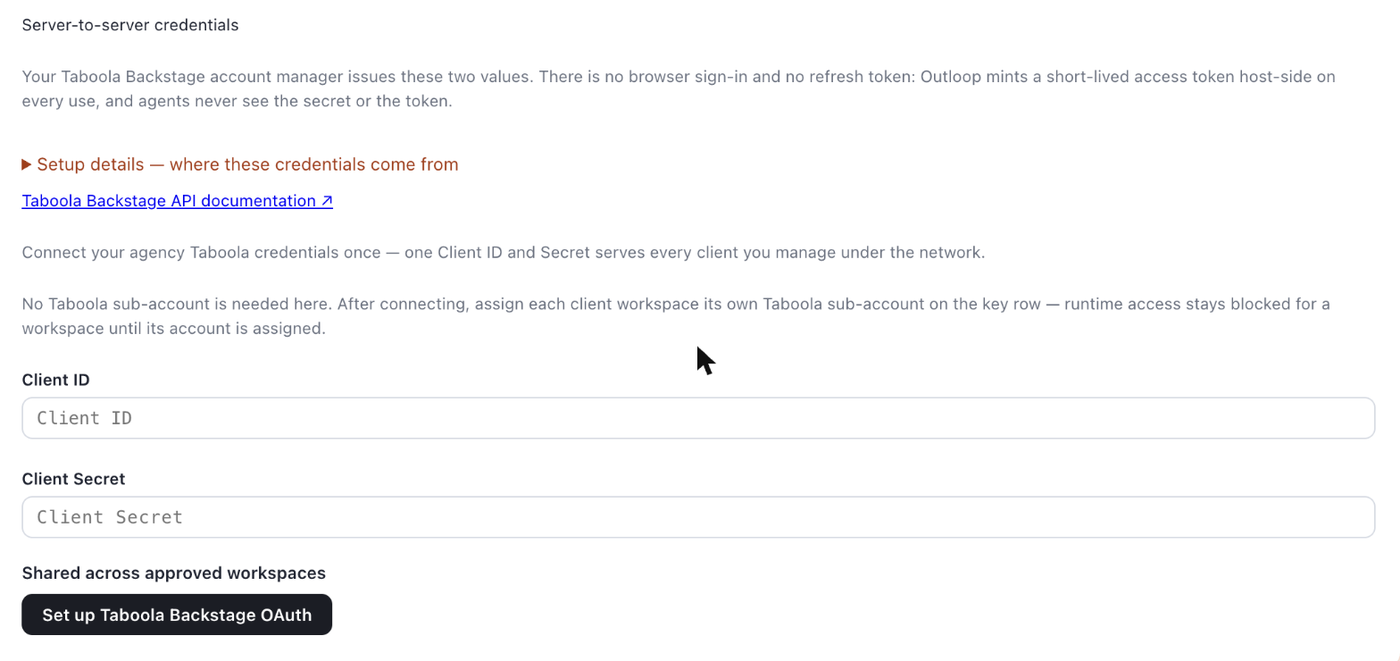
The setup context on this screen is headed “Server-to-server credentials.” It explains that your Taboola account manager issues both values, that there is no browser sign-in and no refresh token, and that Outloop mints a short-lived token host-side on every use. Further detail sits behind “Setup details — where these credentials come from.”
3. Find your advertiser's API account id
You need to know which advertiser you mean. In Realize, use the
account selector at the top left to open the right one. The
numeric Account ID appears underneath the account name, and again in the URL as
accountId=1234567.
You do not need to translate that number yourself. Outloop asks Taboola which accounts your credential may use and pins the one you pick, already in its API form — which is what the next step does.
If you would rather look it up yourself
The credential can authenticate and list accounts before any mapping exists, so you can read the listing directly. Every row carries both identifiers:
GET /backstage/api/1.0/users/current/allowed-accounts

{
  "results": [
    {
      "id": 1234567,                          <- the number Realize shows you
      "name": "Demo Advertiser",
      "account_id": "taboola-demo-advertiser" <- the value Outloop needs
    }
  ]
}
Find the row whose id matches the number you noted in Realize, and take
that row's account_id. That is the
value the manual field expects.
4. Map the sub-account to the workspace
Open Taboola account on the workspace's key row and click Find my Taboola accounts. Outloop asks Taboola which accounts this credential may use, and pins the one you pick — in the API form, so there is nothing to translate.
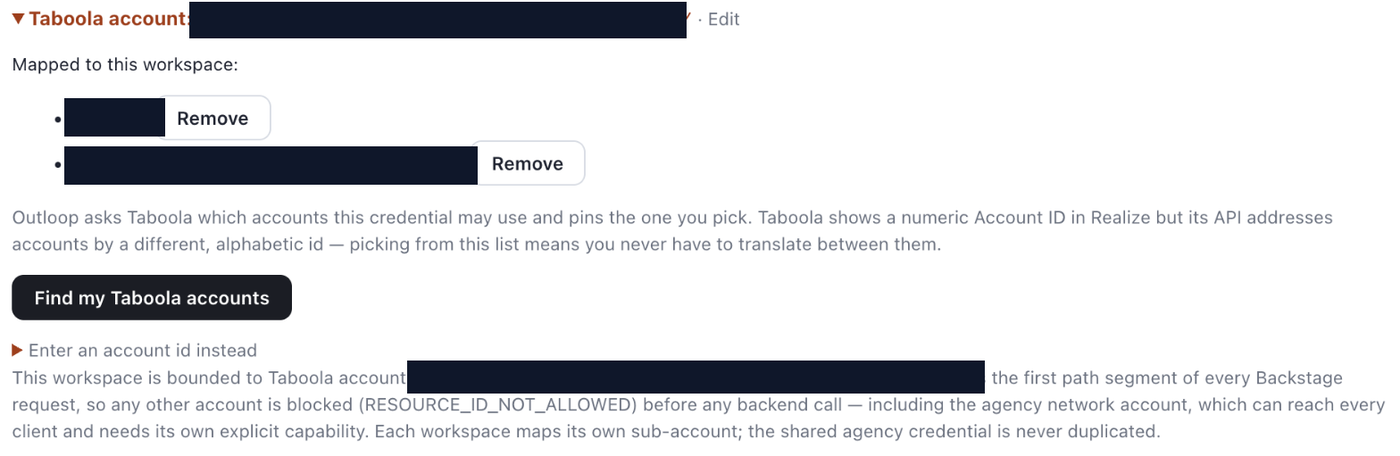
Prefer to type it? Open Enter an account id instead and paste
the alphabetic account_id from step 3 — for example
taboola-demo-advertiser. Several accounts are comma-separated.
Either way, confirm what the row then reports:
“This workspace is bounded to Taboola account <account_id>.”
It goes on to state the mechanism — the account is the first path segment of every Backstage request,
so any other account is blocked with RESOURCE_ID_NOT_ALLOWED before any
backend call. While a workspace is still unmapped, every account-scoped call is blocked with
CUSTOMER_RESOURCE_PIN_REQUIRED instead.
5. Set the access level
Access: Full API access is the default and covers
GET, POST, PUT, DELETE.
Read-only is an explicit downgrade to
GET.

DELETE is part of this connector's declared baseline, so the add flow
writes it and the destructive-intent check finds nothing added. The
Destructive actions (delete / archive) row will read
Enabled immediately. If you do not want agents deleting campaigns, turning it off is a
deliberate act you have to perform — an operator who assumes deletion starts off will be wrong.
Pausing a campaign is not destructive. The classifier treats
paused, running, frozen,
stopped and similar as ordinary changes, so day-to-day pause and resume never
needs that switch. With it off, a delete is refused with
DESTRUCTIVE_ACTION_BLOCKED.
The first safe proof
Taboola requires a passing access check before runtime, so run the proof rather than assuming the
mapping is live. Start with a Grant Preflight, which answers
from local policy with no provider call and no credential read — expect
PREFLIGHT_OK plus the allowed methods and the resource pin.
Then the real proof — an account-scoped read against the mapped advertiser:
GET /backstage/api/1.0/<your-account_id>/campaigns/base?page=1&page_size=1

decision:        allow
code:            OK
http_status:     200
secret_exposed:  false
page and
page_size together. One without the other is ignored.
The isolation property is proven by the negative case, which costs nothing to run — naming the agency network account:
GET /backstage/api/1.0/<the-agency-network-account>/campaigns/base

decision:        deny
code:            RESOURCE_ID_NOT_ALLOWED
detail:          taboola_network_account_requires_network_capability
secret_exposed:  false
That refusal happens before the credential is read and before Taboola is contacted. Network-wide reach is a separate explicit capability that is off, and it should stay off unless you deliberately want network-scoped operations.
GET /backstage/api/1.0/users/current/account is useful — it confirms the
credential works — but it reports the credential's own account, which on an agency
credential is the network account. It does not validate your advertiser mapping. Only
the account-scoped read above does that.
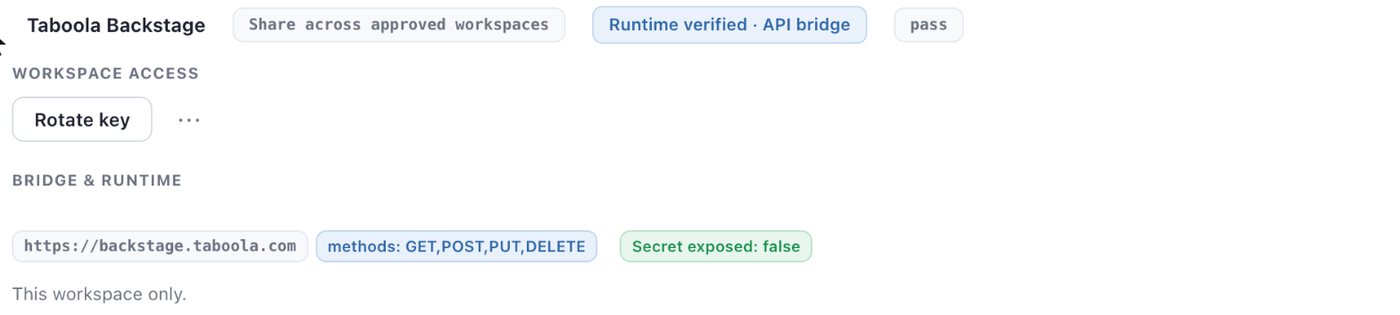
Full API capabilities and write actions
- Verified Live verified through Outloop — actually run against a live agency account and passed: authentication by OAuth client credentials; account-scoped reads (campaigns, reporting); campaign create; campaign update and rename; campaign delete under the destructive switch; and the boundary refusals for the network account and a foreign advertiser, both before any credential was read.
- Supported, not verified yet Bulk operations. The end-to-end proof covered single-object create, rename and delete only. Note that bulk deletes execute unattended under the destructive switch — nothing pauses for a person.
- Off by default Network and cross-account operations. This is a separate explicit capability, it is off, and there is no dashboard toggle for it anywhere — it is configuration-only.
Operational facts you will meet early
- →Writes need
Content-Type: application/json, or Taboola answers415. - →A
401re-mints the token once, on a read only. A write is never replayed, because the provider may already have applied the first attempt. - →Deleting a campaign sets its status to
TERMINATEDand the id then returns404. There is no trash and no undelete in the API. - →
2xxis success. Taboola returns no envelope, so the HTTP status is the answer. A403is a permission fact, and a404on a real campaign usually means it belongs to a different sub-account — neither is a credential problem.
What is verified vs what is not claimed
Tested here: everything in the verified list above, run end to
end on a live agency account on 2026-08-29 — a paused campaign created, renamed, read back and deleted,
with the network account and a foreign advertiser refused before any credential was read, and
secret_exposed: false throughout.
Not claimed:
- ✕That a UI toggle exists for network operations. There is none anywhere in the dashboard — that capability is configuration-only.
- ✕That the account picker validates anything on Taboola's side beyond which accounts your credential may use. It pins what Taboola returns; provider permissions remain Taboola's to grant.
- ✕That a new grant is read-only or non-destructive. It is neither.
- ✕That bulk deletes pause for a human. They do not.
- ✕That a retry window is reported on a provider
429. None is — see below. - ✕That the official Taboola MCP was tested here. It was not connected in this workspace.
Backstage through Outloop vs the Taboola Realize MCP
| Area | Backstage through Outloop | Official Taboola Realize MCP |
|---|---|---|
| Provenance | The Taboola Backstage connector in Outloop, verified here at 1.25.0. | An official Taboola MCP server for the Realize API, published by Taboola. |
| Authentication | OAuth client credentials issued to your agency. No person signs in; Outloop mints the short-lived token host-side. | A person signs in, and the tools run as that signed-in session. |
| Per-client scoping | Each workspace is pinned to one advertiser. Any other account is refused before the credential is read. | Reach follows whoever authenticated. There is no per-workspace advertiser boundary. |
| Credential handling | Client secret stays in the macOS Keychain and is read host-side at request time. The agent never sees it. | Not applicable here — no credential of yours is held by Outloop on this path. |
| Destructive actions | A named switch on the key row. For this connector it ships enabled — see the setup steps. | Governed by the MCP server and the signed-in account, not by Outloop. |
| Audit trail | One redacted line per attempt: workspace, service, action class, the resource addressed, and the capability that authorized it. | Not applicable here. |
| Status here | Live verified through Outloop Real read, write and boundary proof, 2026-08-29. | Official MCP exists Not connected here; not verified in this guide. |
When something is refused
- →
404 api.action.resource_not_found, messageaccount— an identifier shape problem, not a permission one. You almost certainly mapped the numeric Realize ID instead of the alphabeticaccount_id. Re-check against the allowed-accounts listing and re-map. Rule this out before asking Taboola about permissions. - →
/users/current/accountshows a different account — expected on an agency credential. That is the network or partner identity of the credential itself. It neither replaces nor validates your workspace mapping. - →Visible in Realize, but the API call fails — confirm the
account_idyou pinned actually appears in the allowed-accounts listing. Check provider permissions only after that. - →
RESOURCE_ID_NOT_ALLOWED— the request named an account this workspace is not mapped to. If the detail istaboola_network_account_requires_network_capability, it named the agency network account: expected, and deliberate. - →
CUSTOMER_RESOURCE_PIN_REQUIRED— no sub-account is mapped yet. The credential authenticates and can list accounts, but every account-scoped call is blocked until you map one. - →Rate limiting is two different things. A provider
429on an API call stays adecision: allowcarrying the realhttp_status: 429— Outloop refused nothing, the provider did. Taboola documents no general limit (realtime reports are the exception at roughly 10 requests per minute) and Outloop invents no retry delay, so none is reported. ABACKEND_RATE_LIMITEDdeny is different: that is the OAuth token mint being throttled, and it does carryretry_after_s. Either way a non-idempotent write is never replayed automatically — re-send deliberately. - →
DESTRUCTIVE_ACTION_BLOCKED— the workspace's Destructive actions switch is off. That is a setting, not a request for approval, and nothing is waiting for anyone.
What keeps one client separate
- ✓The secret never reaches the agent. Neither the client secret nor the minted token is returned to the agent, written to project files, logs, policy or the audit trail. Every allowed response carries
secret_exposed: false. - ✓Workspace pinning — identity is derived from the real folder path, never from the request body.
- ✓Advertiser pinning — the account is the first path segment of every Backstage request, so any other account is refused before a backend call.
- ✓Network boundary — the agency account is recognised under both its identifiers and stays unreachable without the explicit capability.
- ✓One approved host, HTTPS only —
backstage.taboola.comunder/backstage/api/1.0/. The token endpoint sits outside that prefix and is unreachable by an agent. - ✓Audit trail — one redacted line per attempt with the workspace, service, action class, the resource addressed, and the capability that authorized it.
- ✓No unsafe replay — non-idempotent writes are never retried automatically.
Replacing the credential pair starts on Taboola's side: your account manager issues a new Client ID and Client Secret. You then use Rotate key on the Outloop key row to enter the new pair. The workspace mapping, the access level and the destructive-actions setting are untouched.
Official documentation
- →Backstage API authentication basics
- →Client credentials flow
- →Get Allowed Accounts — the endpoint carrying both identifiers
- →Backstage API reference
Outloop is available with setup guides and product support for agency teams. Outloop is an independent tool and is not affiliated with or endorsed by Taboola. See the security model for how credentials are stored and used, or the other connector setup guides.
One agency credential. The right client account, every time.
Run Taboola work across client workspaces without handing an agent the client secret.