Use case · GTM engineering
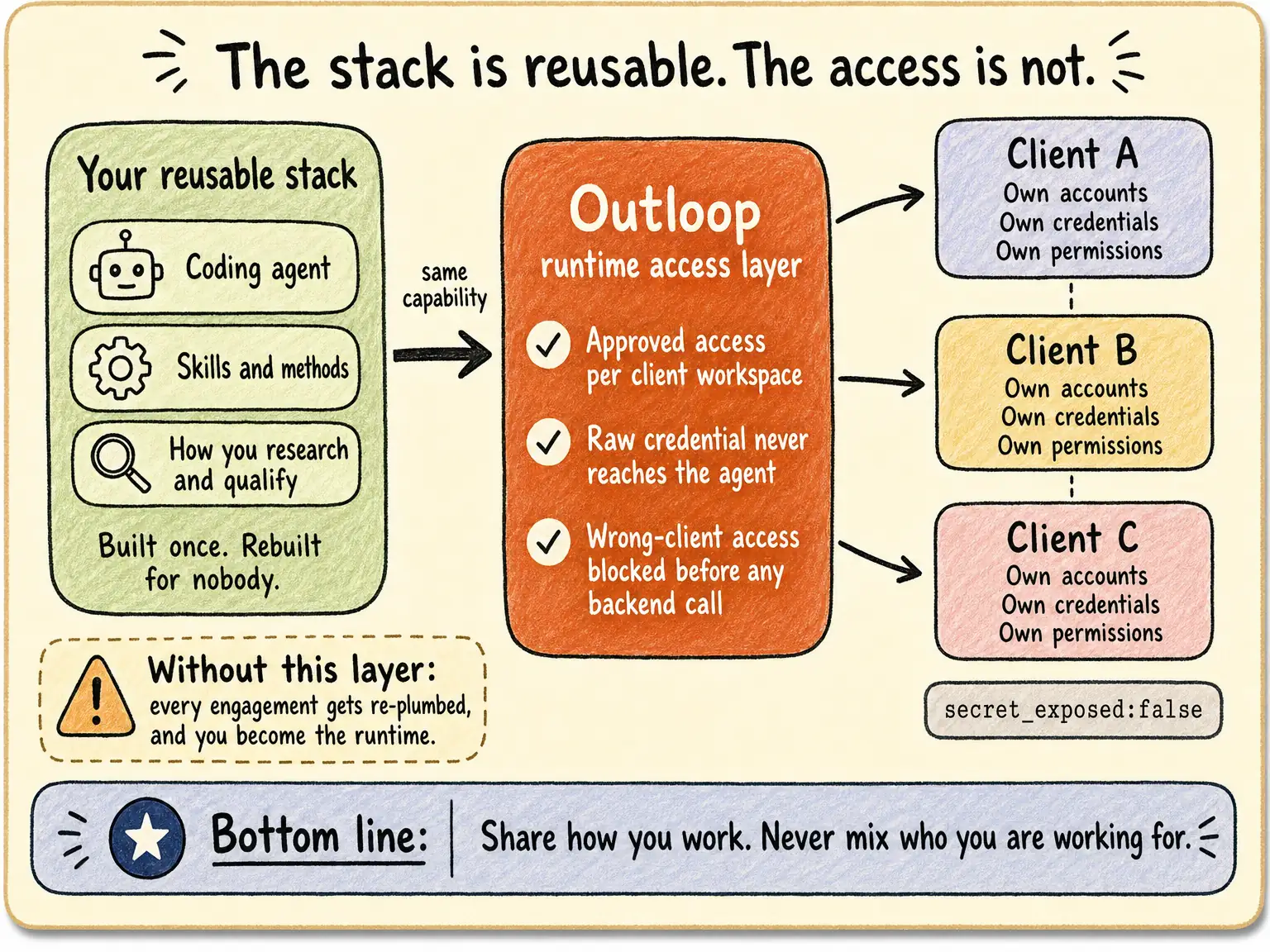
Reuse the reporting method. Configure each client’s systems.
Last updated:
In short
Outloop is Workspace infrastructure for deploying and operating AI workers.
For a recurring GTM report, reuse the research, data-checking and reporting method while configuring each client’s approved source accounts, metric definitions and delivery destination separately. Outloop keeps supported AI work associated with the client Workspace; each workflow still needs validation.
| Layer | Reusable method | Client-specific setup |
|---|---|---|
| Workflow | Reviewed steps, Skills and Routine patterns | Client brief, approvals and validation |
| Systems | Supported integration pattern | Approved account and resource identifiers |
| Runtime | Supported engine configuration approach | Readiness and workload verification |
| Private state | No automatic transfer | Context, files and work history stay with the client |
The method repeats. The client changes.
A GTM team may deliver a similar research, CRM or reporting workflow to several customers. The structure can repeat; the client’s identity, business rules, approved systems and data cannot be treated as interchangeable.
Outloop organizes supported AI work around a separate client Workspace. It is useful when your team works across external customer environments and needs a clear relationship between the task and the resources it may use.
Example blueprint: a weekly client performance review.
This is an implementation blueprint, not a claim that every CRM/advertising combination is prebuilt or a recorded end-to-end case.
- Define: agree the client, reporting period, timezone, conversion definitions and reviewer.
- Collect: read the approved ad account and supported CRM/analytics sources. Confirm identifiers and date ranges before comparing results.
- Reconcile: identify missing records, attribution-window differences and inconsistent metric definitions. Flag uncertainty rather than forcing the numbers to match.
- Prepare: produce a source-linked report in the client’s approved file destination, separating observed results from recommendations.
- Review: a person approves consequential changes. Reporting access is not permission to change spend, tracking or customer records.
For the next client, reuse the reporting logic and validation checklist; configure its accounts, metric mappings, definitions, destination and reviewers separately. Verify each service’s supported operations in the capability catalogue.
Separate reusable work from client-specific setup.
| May be reused after review | Must stay client-specific |
|---|---|
| A generic research or reporting method | The client’s brief, private Context and results |
| A client-neutral checklist or Skill | Approved accounts, resources and access |
| A verification approach | The evidence of what actually ran for this client |
| A delivery template with no client data | Files, recipients and business approval decisions |
Copying a method is not permission to access another customer’s systems. Reviewed learning and client access setup are separate responsibilities.
See the stack carry one client job through.
Watch Context, approved systems and human decisions come together in a real campaign build. Use the workflow as an example when designing your own client stack.
- Approved client Context and brand assets
- Human review before execution
- Real campaign objects, kept PAUSED
Create your trial, then install on your company-controlled Mac. Set up your first workspace.
67-second Ellātu preview · Google Ads + Meta · No form required
Demo brief and assumptions. Real Google Ads and Meta execution, configured PAUSED. Review emails are labeled staged reconstructions. No delivery or performance claim.
Build one complete, bounded workflow.
- Agree the deliverable and the intended client.
- List the source systems, target resources and files.
- Configure supported access and required review.
- Verify a low-impact task and the relevant refusal boundary.
- Inspect the output and record what needs a human decision.
The campaign recording is one example of context, systems and review working together. It is not proof that every CRM or GTM combination is already implemented.
Prevent wrong-client actions before scaling repeated work.
Implementer deployment foundation · Agency operating model.
Keep the client setup useful as tools change.
Supported runtimes can work around the client Workspace. That separates the client’s identity and approved setup from an individual AI tool. Runtime configuration still matters, and full conversation or machine migration is not promised.
Check Product and current requirements, the broader agency operating model, or estimate a client implementation.
The intended client, approved action and reviewable result
- 01
Client task
Start with the intended client and a defined result.
- 02
Approved Workspace
Use this client’s Context, accounts and resources.
- 03
Supported action
Work through the approved API, browser or file path.
- 04
Reviewable result
Inspect the output and involve a person where required.
- 05
Work history
Keep the work record with the intended Workspace.
Conceptual workflow. Supported actions depend on the configured service, runtime and approved resources.
What Outloop enforces — and where the boundary is
What Outloop enforces
- Keep supported work tied to the configured client accounts and resources.
- Retain approved client Context and reviewable work records.
What it does not guarantee
- Support depends on the service, runtime and configuration.
- Complete session, provider and machine migration is not promised.
What you still configure
- Configure approved accounts, resources and Context separately for each Workspace.
- Validate the client boundary and output before expanding.
Is this for you?
A good fit if…
- You deploy repeatable AI work into real client systems.
- You need separate client context, resources and review.
You may not need Outloop if…
- You need universal model or machine migration today.
- You need automatic deployment cloning or automatic cost routing.
Where real client work breaks
Rebuilding access per client is one of five places real client work breaks once agents leave the demo:
“Wrong-client access blocked” — what it looks like
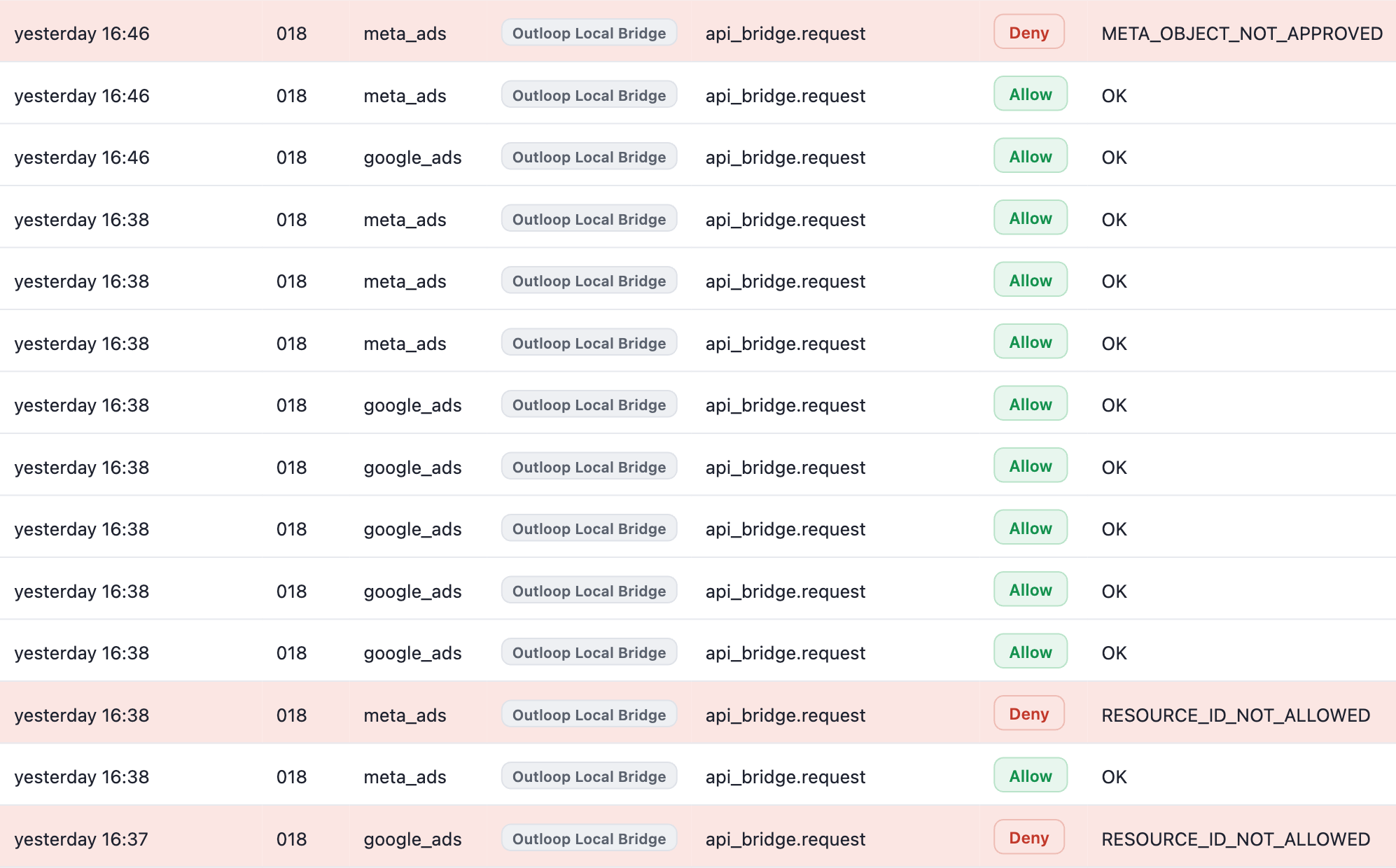
The table’s promise, recorded in a demo workspace: a request for an account outside the workspace’s binding is refused before the credential is read, a campaign outside the bound ad account is refused before the action is sent, and the workspace’s approved requests keep running.
Swipe sideways to read the log · open full size
Refused: these wrong-resource requests did not run
- Deny ·
RESOURCE_ID_NOT_ALLOWED(google_ads and meta_ads) — the request named an account outside this Workspace’s approved resources; the requested action was refused - Deny ·
META_OBJECT_NOT_APPROVED(meta_ads) — a campaign, ad set or ad that does not belong to the approved ad account; the requested action is not sent to Meta - Approved requests in the same workspace keep executing around the refusals — Allow · OK
Real execution in an Outloop demo workspace (workspace 018), published in the September 26, 2026 proof pack — not a customer case study, and not evidence of ad spend, delivery or performance. Enforcement covers requests routed through Outloop. See the runtime access walkthrough for the recorded flow.