




For AI agencies using MCP and agent tools

MCP gets messy when every client needs a different account.

Stable API access for multi-client MCP agent workflows.

Agents request access, not keys.

MCP is great for connecting an agent to a tool. But real agency workflows break down when every client needs different credentials, accounts, folders, and permissions. Outloop gives agents approved API access per client workspace — without exposing raw keys, copying .env files, reconnecting tools, or risking wrong-client access.

No copied keys. No .env files. Wrong-client access blocked.

Create your trial. Download the Mac app. Run your first API proof locally.

Guided setup included · API keys stay local · Cancel anytime

outloop runtime access vault stays locked

One access setup Workspace approved Runtime allowed secret_exposed:false

Reuse approved API access across the runtimes your team already uses

One approved access layer for Cowork-style sandboxes, Claude Code, Codex, Hermes, and OpenClaw — without rebuilding setup for every platform.

One credential. The right workspace. Any approved agent runtime. secret_exposed:false

Independent tools. Names and logos belong to their respective owners; Outloop is not affiliated with or endorsed by these projects.

MCP alone · across many clients

  • Client A → Airtable account A
  • Client B → Airtable account B
  • Client C → reconnect / another setup
  • Client D → .env workaround
Repeated setup per clientOne connector contextWrong-account riskAgent asks for a key again

With Outloop · one approved access path

  • 1Client workspace
  • 2Outloop policy check
  • 3Approved API access
  • 4Redacted runtime result
Workspace approvedRuntime allowedsecret_exposed:falseWrong-client blocked

MCP connects the tool. Outloop controls which client workspace can use which access.

Use case · MCP multi-client access

MCP for multi-client AI agents

Last updated:

In short

Outloop is the runtime access layer that gives MCP agents approved API access per client workspace — so multi-client agencies stop reconnecting tools, copying keys, and risking wrong-client access.

MCP connects an agent to a tool. It gets messy when every client needs a different account, credential, workspace, and permission. Outloop works alongside your agent tools and controls which client workspace may use which approved API access at runtime: the agent requests access, policy is checked before the credential is used, the raw key never reaches the agent, wrong-client calls are blocked, and every request is audited.

MCP works until every client needs a different setup.

MCP is great for connecting an agent to a tool. The problem starts when an agency runs agents across many clients. Each client may need:

  • a different Airtable base
  • a different Asana workspace
  • a different Google Ads customer ID
  • a different CRM account
  • a different OAuth connection
  • a different API token
  • a different folder or sandbox
  • a different permission boundary

Without a runtime access layer, teams end up reconnecting tools, copying setup instructions, editing skills, using .env files, or asking the operator for keys again.

MCP connects the tool. Outloop controls which client workspace can use which access.
Before Outloop, MCP becomes another setup loop.

Before · MCP alone

Reconnect tools per client

Agents work until a browser/OAuth session expires or the connector context changes — then setup starts over.

One connector, many clients

A single MCP setup is fine for one account, but gets messy across many client workspaces.

Keys drift into files

When access breaks, teams fall back to .env, docs, TXT files, or copied project templates.

Wrong-client risk

A workflow can accidentally use the wrong account, credential, folder, or customer ID.

After · with Outloop

Add approved access once

Store approved access locally on the Mac or an approved backend. The raw secret never leaves it.

Assign it to the right workspace

Each client workspace gets explicit access rules — service, host, alias, and scope.

Let agents request access

The agent requests the alias or API action through Outloop, not a credential.

Prove every request

Outloop checks policy, performs the call, redacts output, and writes a local audit.

How Outloop fixes MCP access problems.

1

Connect approved API access

Add access once in Outloop. The raw secret stays local and never goes into chat, project files, .env, or skill instructions.

2

Grant it to the right client workspace

Approve which workspace, project, agent runtime, service alias, host, and auth scheme may use it.

3

Agents request access, not keys

The agent asks Outloop for approved runtime access. Outloop checks policy before the credential is used.

4

Wrong-client access is denied

If the workspace, account, host, alias, or policy does not match, Outloop denies before reading the credential.

A brokered request: action in, redacted result out

  1. 01

    Agent request

    The agent asks for an approved action or alias — not a raw key.

  2. 02

    Policy & tenant check

    Outloop checks project, tenant identity, and runtime policy before anything runs.

  3. 03

    Local broker

    On approval, the local broker uses the credential on the wire to perform the call.

  4. 04

    Redacted result

    The agent receives a sanitized, non-secret result. Raw values never enter its context.

  5. 05

    Audit log

    Every attempt is written to a redacted local audit — decision, tenant, service.

The agent never sees the credential. A wrong-tenant request is denied at the policy check, before any backend call.

How it works

How you reuse API access in 3 steps

Add it once. Approve the workspace. Let the agent use it safely.

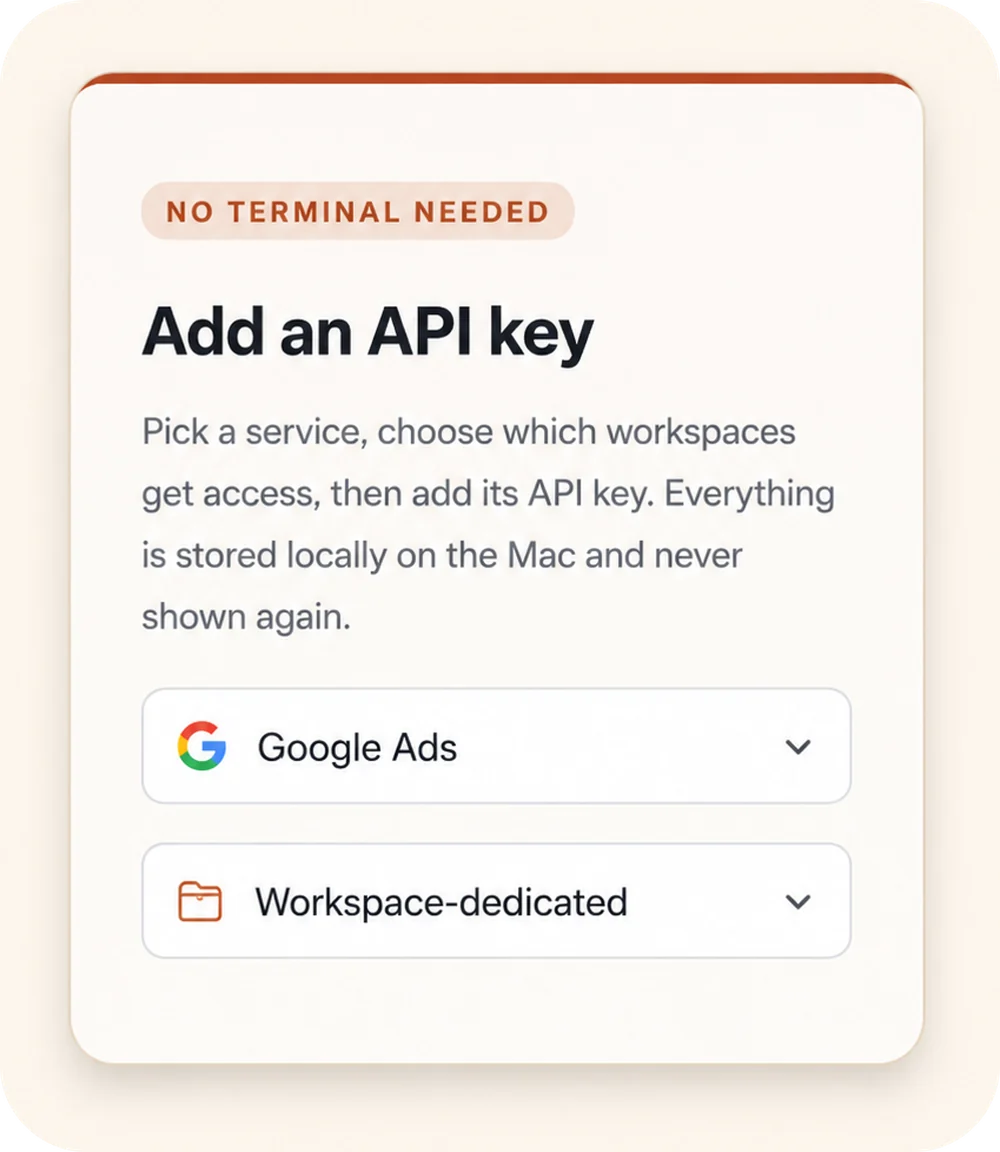
Outloop “Add an API key” panel: a “No terminal needed” badge, a service picker set to Google Ads, and a Workspace-dedicated access selector.
00

Add API access once

Choose a service, select the workspaces that should get access, and store the credential locally on the Mac.

Keys stay local
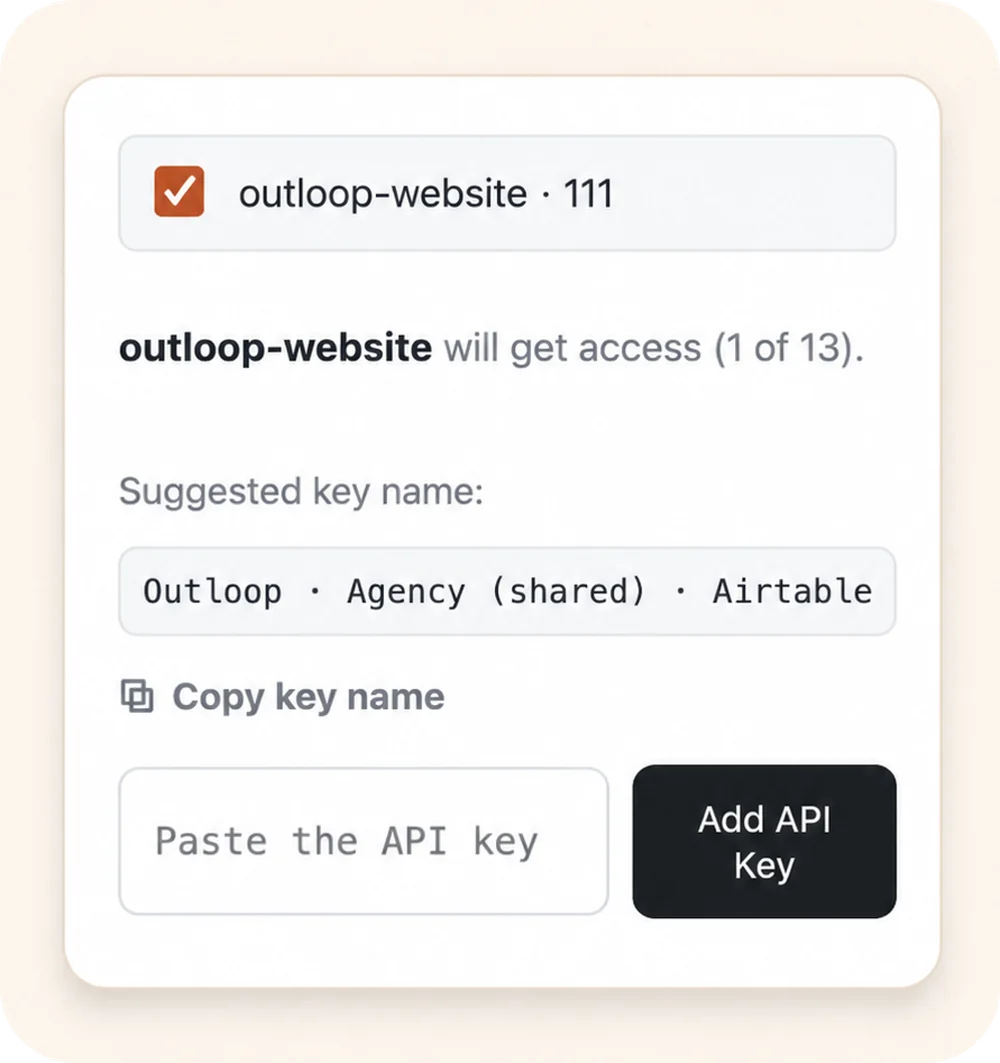
Outloop workspace approval: the outloop-website workspace selected to receive access, with a suggested key name and an empty “Paste the API key” field.
00

Approve the right workspace

Grant access only to the client workspace that should use it. Each workspace stays isolated.

Wrong-client access blocked
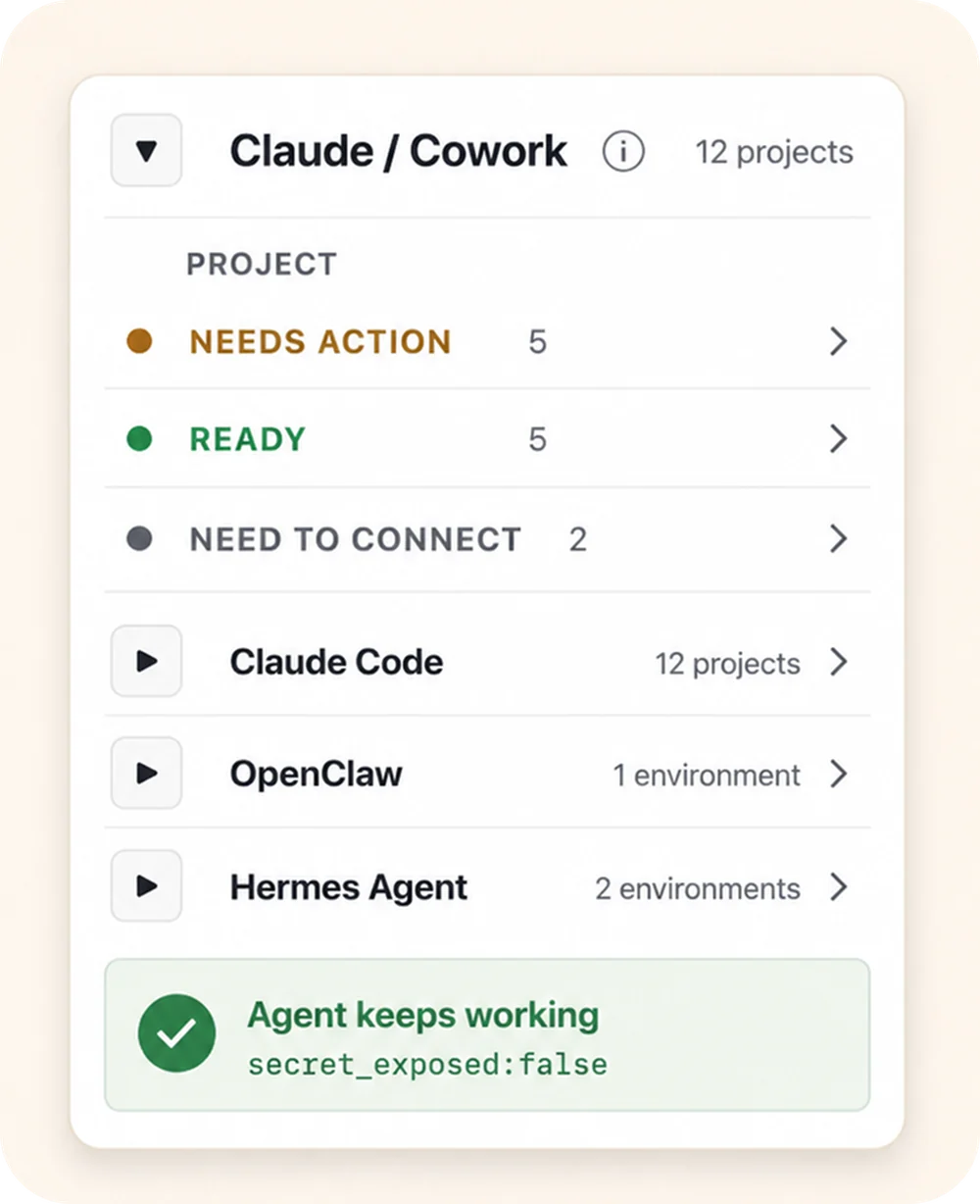
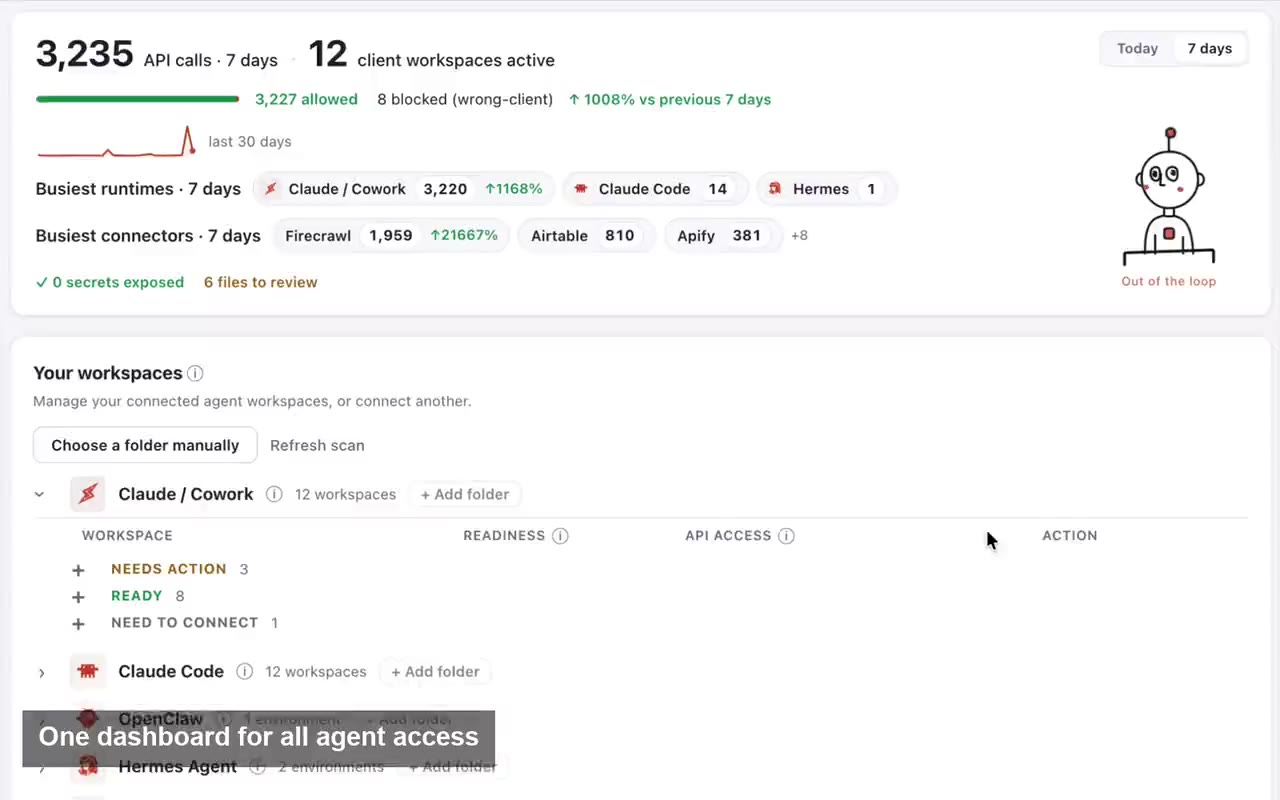
Outloop agent-projects panel: the Claude / Cowork runtime expanded to show per-project status (Needs action, Ready, Need to connect), above the Claude Code, OpenClaw, and Hermes Agent runtimes, with an “Agent keeps working — secret_exposed:false” proof badge.
00

Let agents use approved access

Connect agent projects, then let approved agents request access through Outloop without seeing the raw key.

Agent keeps working secret_exposed:false

Keys stay local Workspaces stay scoped Agents request access, not keys

MCP alone vs Outloop

For real multi-client agency workflows. MCP alone does not give agencies a complete client-workspace access model.

MCP connects agents to tools; Outloop controls approved API access per client workspace. The two work together.
For multi-client agencies MCP aloneOutloop
Connect an agent to a tool YesWorks alongside agent tools
Multi-client workspace routing Usually messy or manualBuilt around client workspaces
Different account per client Reconnect or duplicate setupAssign access per workspace
Agent asks for a key Can still happenAgent requests approved access
.env workaround Common fallbackNot needed for approved access
Wrong-client risk Hard to governPolicy check before credential use
Audit proof Depends on the toolLocal audit and proof receipt
Raw key exposure Depends on setupRaw key not returned to the agent
Agency workflow proof

Built from real agency API workflows.

Outloop was built while running real client-agent workflows across ads, CRM, data, reporting, and automation APIs.

The lesson was simple: agencies don't need another place to paste keys. They need one approved access layer that lets agents work across client workspaces safely.

Explore agency API workflows
Google Ads Campaign checks
Meta Ads Account reporting
Merchant Center Product feed review
Airtable CRM & ops data
Apify Data collection
Firecrawl Web research

Example services shown for workflow context. Logos and names are trademarks of their respective owners; no official integration or endorsement is implied.

Keep the agent useful. Keep the secret out of the workspace.

Outloop is not a vault and does not turn your website into another place to store secrets. It runs locally on the Mac, works above approved backends like Keychain, and lets agents use approved access without ever seeing the raw credential. See the security model and why it's not a vault.

No API keys uploaded to Outloop Cloud

No raw key returned to the agent

No .env file required

Workspace policy checked before runtime use

Wrong-client access blocked

Local audit written · redacted result returned

Keep your vault. Control runtime access.

1Password
macOS Keychain
Infisical
Doppler

Outloop works above Keychain, 1Password, Infisical, Doppler, and other secure backends. It does not replace your vault. It controls which workspace and runtime can use approved access.

  • No API keys uploaded to cloud.
  • No raw key returned to the agent.
  • No .env files required.
  • Wrong-client access is blocked before credential use.

Running agents across more than one client?

If your MCP setup breaks when every client needs a different account, workspace, or credential, Outloop turns that into one approved runtime access layer — keys stay local, wrong-client access is blocked, every request is audited.

Guided onboarding included · API keys stay local · First API proof in minutes. The local-first app is verified on the founder's Mac; Apple signing/notarization and second-machine reproduction are in progress. Related: AI agencies, agent runtime access, API key management, hiding keys from coding agents, pricing.

Frequently Asked Questions

MCP for multi-client AI agents — FAQ

Ready to get out of the API loop?

Run more client AI workflows without rebuilding API access every time.

Connect API access once and reuse it across every client workspace — instead of rebuilding setup for each new one.

For agencies and operators managing 5 to 100 client workspaces.