Guides · Setup
Connect Outbrain Amplify to your AI agents — without giving them the token
Last updated:
In short
Outloop connects Outbrain Amplify to your AI agents using an Amplify API token stored in your Mac's Keychain — on an Outbrain account that already has partner-level API access.
Agents read and manage campaigns, budgets and promoted links while the token is injected host-side and redacted out of every response, audit line and log. Each client workspace is pinned to exactly one Outbrain marketer, and a request naming any other is refused before the token is read.

What this gets you
Your agent works in Outbrain Amplify — reads campaigns, budgets and promoted links, and, once you enable it,
writes them — and never sees the token. The token lives in your Mac's
Keychain, is injected into each request host-side as OB-TOKEN-V1, and is redacted out
of every response, audit line and log. The agent uses the credential's capability without ever seeing it.
One agency token can reach several marketers. Each client workspace is pinned to exactly one of them, and a request naming any other marketer is refused before the token is even read.
- ✓Campaign, budget and promoted-link reads for the pinned marketer.
- ✓Marketer discovery by name — you never have to go and find an opaque marketer id.
- ✓A client boundary that is enforced before any credential is read, not after the call comes back.
- ✓One redacted audit line per attempt, with the capability that authorized it.
Before you start
/login endpoint that exchanges a password for a token. Outloop does not store Outbrain
credentials and never calls it — and because that endpoint sits inside the API path Outloop is allowed
to use, it is blocked by name, on every method.
1. Generate the token in Outbrain
Open your Amplify API Token page, enter your password there, and click generate. Copy the token — you will paste it into Outloop once.

2. Add it in Outloop
In Outloop, open API Keys and pick Outbrain Amplify. Choose whether the token is dedicated to one workspace or shared across several — an agency token that serves multiple clients is the shared case — then paste it.


Stored · API bridge on · no proof yet.

3. Choose this workspace's marketer
Outbrain marketer ids are opaque strings that appear nowhere obvious in the Amplify interface. You do not have to go and find one. Press Find my Outbrain marketers — Outloop asks Outbrain which marketers your token can reach and lists them by name. Pick the one that belongs to this client.
Listing approves nothing. The workspace is bound only when you choose, and the pin summary then reads
Outbrain marketer: <id> ✓ instead of not set.
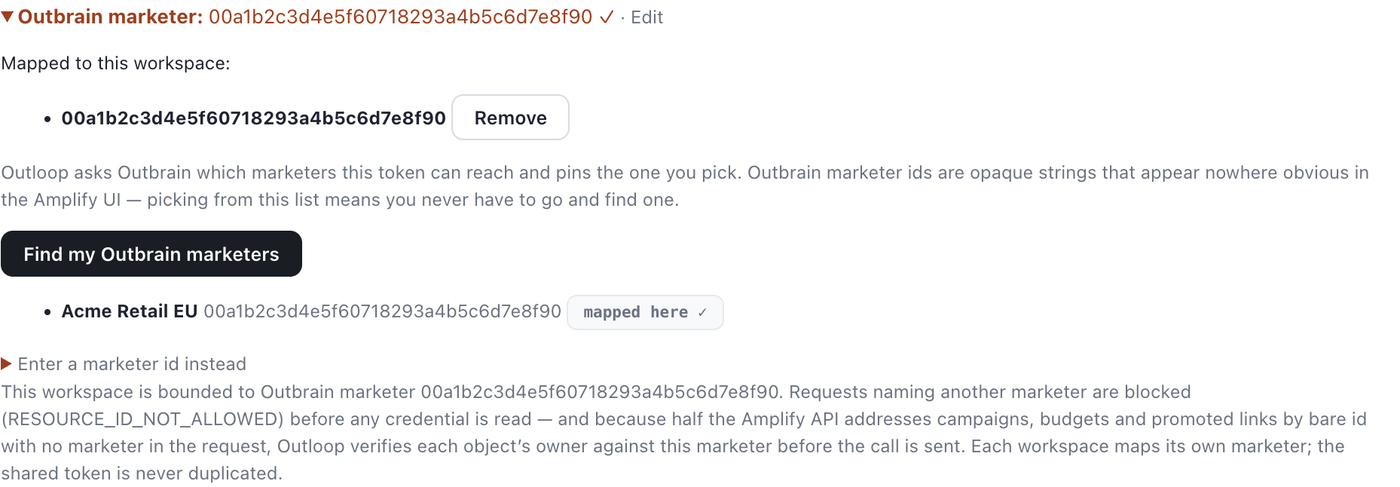
RESOURCE_ID_NOT_ALLOWED) before any
credential is read. And because roughly half the Amplify API addresses campaigns, budgets and promoted
links by bare id with no marketer in the request, Outloop verifies each object's owner against this marketer
before the call is sent.
4. Confirm access is on
Re-run the access check. Once a marketer is pinned, the check moves to a marketer-scoped read, so it proves the thing that actually matters: not just that the token authenticates, but that it can reach this workspace's marketer.

Runtime verified · API bridge. Before a marketer is chosen, a passing check tells you the token works but that resource-scoped calls stay blocked.The first safe proof
Two stages, and the second is the one that counts. Both returned HTTP 200 with
secret_exposed: false against a real Outbrain account on 2026-09-02.
- →
GET /amplify/v0.1/marketers— proves the token authenticates and names the marketers it reaches. - →
GET /amplify/v0.1/marketers/{id}/campaigns— proves this workspace's pinned marketer is reachable.
GET /amplify/v0.1/marketers/{marketer_id}/campaigns

decision:        allow
code:            OK
http_status:     200
secret_exposed:  false

marketer:        the one pinned to this workspace
returned: live campaign data, token absent from the result And the shape of a refusal, which is the more interesting receipt — nothing left this Mac:
GET /amplify/v0.1/marketers/{some_other_marketer}/campaigns

decision:        deny
code:            RESOURCE_ID_NOT_ALLOWED
http_status:     null      <- no Outbrain call was made at all
kc_operation:    null      <- the Keychain was never opened
secret_exposed: false Full API capabilities
Every line below carries exactly one status. "Verified" means it was actually run through Outloop against the live Outbrain API and passed — it is never a product-level property.
- Verified Reads. A real agent read ran through Outloop's normal runtime path and returned 32 KB of live campaign data for the pinned marketer:
allow,OK, HTTP 200,secret_exposed: false, with the token absent from the result. - Verified The marketer boundary. A request naming a marketer this workspace is not approved for was refused with
RESOURCE_ID_NOT_ALLOWED, with no provider call and no Keychain read. The refusal happens before the credential is touched. - Not provable on this credential Cross-marketer isolation between two workspaces. The account available for the proof reaches exactly one marketer, so a second-workspace denial could not be demonstrated at all. The pin-enforcement half is proven; this half is not, and we are not going to describe it as verified isolation.
- Supported, not verified yet Writes. Campaign create, update, pause and resume; budget writes; promoted-link writes. Allowed by Outbrain and permitted by Outloop's policy — no write has been run against the live provider.
- Supported, not verified yet The child-route ownership pre-read on
/campaigns/{id},/budgets/{id}and/promotedLinks/{ids}. Exercised in offline suites against a fake provider, which proves the logic but not the provider's real field names. - Supported, not verified yet
/loginblocking and rate-limit handling. Both are proven offline only — the 429 model was exercised with injected responses, never a natural throttle from Outbrain. - Enabled — and irreversible Removal.
DELETEis in this connector's baseline, so destructive actions ship enabled. Switching them off is a deliberate act you perform. The Amplify API has no restore method of any kind. - Official MCP exists Outbrain's Amplify MCP server. A real, official Outbrain product. Not connected here, so nothing about it is verified in this guide.
Write actions
Budget changes are ordinary work. They move real money, and they are the most common write an agency performs — gating every one behind a prompt is the gate that gets switched off within a week. They run, and they are audited. Nothing in Outloop waits for a person once full API access is on.
Removal is the one capability control. DELETE
membership gates removal, single and bulk. Bulk reach is stated in the path — a comma-separated id list — so the
affected count rides the decision rather than being discovered afterwards.

rate-limit-msec-left header, or is reported as unknown — Outbrain has published its
per-marketer limit as 5, 10 and 30 per minute at different times, so Outloop does not invent a number.
What was tested, and what is not claimed
Against the real Outbrain API on 2026-09-02, on the installed 1.29.6 app:
- ✓Stage-1 access check on an unpinned workspace — passed, HTTP 200.
- ✓Marketer discovery returning the real marketer by name, with the token absent from the response.
- ✓Stage-2 marketer-scoped check — passed, HTTP 200.
- ✓A real agent read through the runtime path — allow, OK, HTTP 200, 32 KB of live campaign data,
secret_exposed: false. - ✓A non-approved marketer refused before the Keychain was opened, with no provider call.
- ✓A leak scan across results, audit files and broker logs — clean.
And what this page deliberately does not claim:
- ✕No write has been run against the live provider. Campaign, budget and promoted-link writes are supported and policy-allowed, but unproven.
- ✕The removal gate has not been exercised live.
- ✕The child-route ownership pre-read has not been exercised live — the offline suites use a fake provider, so they prove the logic, not the provider's real field names.
- ✕
/loginblocking is proven offline only. - ✕Rate-limit handling is proven offline only, with injected responses and never a natural 429.
- ✕Cross-marketer isolation between two workspaces is not provable on the available credential, which reaches exactly one marketer.
Outbrain's MCP server
Outbrain publishes an official Amplify MCP server at
https://amplifymcp.outbrain.com/AmplifyMcp/mcp/ with bearer-token auth, covering
campaign management and reporting. It is a real product and this guide does not disparage it. Outloop has not
connected or tested it, so nothing about it is verified here.
Worth knowing: the MCP server requires the same partner API approval and the same personal access token. Outbrain's own setup instructions tell you to apply for API access and await approval first. It is not a way around the access gate.
| Area | Amplify API through Outloop | Official Outbrain Amplify MCP server |
|---|---|---|
| Provenance | The Outbrain Amplify connector in Outloop, verified here against product 1.29.6. | An official MCP server published by Outbrain at amplifymcp.outbrain.com. |
| Access precondition | Partner-level Amplify API access, granted by Outbrain on request. | The same partner API approval and the same personal access token. It is not a way around the gate. |
| Authentication | One Amplify token per client, held in the macOS Keychain and injected host-side as OB-TOKEN-V1. | A bearer token supplied to the MCP client as an environment variable. |
| Per-client scoping | Each workspace is bound to exactly one Outbrain marketer, checked before the credential is read. | Reach follows the token. There is no per-workspace marketer boundary. |
| Objects addressed by bare id | Campaigns, budgets and promoted links have their owner verified against the pinned marketer before the call is sent. | Governed by the MCP server, not by Outloop. |
| Credential handling | The token never reaches the agent, the chat, your project files or your logs. Allowed responses carry secret_exposed: false. | Not applicable here — no token of yours is held by Outloop on that path. |
| Audit trail | One redacted line per attempt: workspace, service, action class, the resource addressed, and the capability that authorized it. | Not applicable here. |
| Status here | Reads verified Read path and the marketer boundary proven 2026-09-02. No write has been run. | Official MCP exists Not connected here; nothing about it is verified in this guide. |
When something is refused
| What you see | What it means | What to do |
|---|---|---|
CUSTOMER_RESOURCE_PIN_REQUIRED | No Outbrain marketer is pinned to this workspace yet. | Use Find my Outbrain marketers and pick one. Resource-scoped calls stay blocked until it is set. |
RESOURCE_ID_NOT_ALLOWED | The request named a marketer this workspace is not approved for. Nothing was sent, and the Keychain was never opened. | Nothing to fix — this is the client boundary working. |
OUTBRAIN_OBJECT_NOT_APPROVED | A campaign, budget or promoted link whose owner is not the pinned marketer — or whose owner could not be determined. The target was never sent. | "Cannot tell" is deliberately treated as "not yours". Check the object belongs to this client. |
OUTBRAIN_LOGIN_BLOCKED | Something tried to call Outbrain's /login endpoint. Outloop never does. | Expected; no action. |
DESTRUCTIVE_ACTION_BLOCKED | Removal has been switched off for this workspace. | That is a capability setting, not an approval queue. Nobody is being asked. |
BACKEND_AUTH_FAILED with HTTP 401 | Outbrain rejected the token — expired after 30 days, revoked, or the account lacks Amplify API access. | Generate a new token and rotate it in. Outloop cannot mint one. |
HTTP 404 on an object you can see in Amplify | It usually belongs to a different marketer than the one pinned here. | Also isolation working. Check which marketer owns it. |
What keeps one client separate
- ✓The token is stored in the macOS Keychain and read host-side at request time. It is never displayed after you paste it.
- ✓Outloop injects
OB-TOKEN-V1itself. An agent can neither supply nor read it, and never sends its own authentication header. - ✓Requests are bounded to
api.outbrain.comunder/amplify/v0.1/— and/loginis blocked by name inside that path, on every method. - ✓Each workspace is pinned to one marketer, checked before the credential is read. "Cannot determine the owner" is treated as "not yours".
- ✓Every attempt writes one redacted audit line locally — allowed or refused, with the capability that authorized it.
Rotation. Because a new token does not invalidate the old one, rotate by generating the replacement first, pasting it into Outloop, confirming the access check still passes, and only then letting the previous token lapse. There is never a moment where the workspace has no working credential.
Official documentation
- →Outbrain Amplify — request API access — the form that gates everything on this page.
- →Outbrain Developer Center — Amplify API application
- →Outbrain — how to connect to the Amplify MCP server
Setting up native advertising for more than one client? The Taboola Backstage guide follows the same shape — and unlike this one, its write path has been runtime-proven end to end. The reasoning behind the boundary itself is in agent API key management.
Outloop is available with setup guides and product support for agency teams. Outloop is an independent tool and is not affiliated with or endorsed by Outbrain. Amplify API access is granted by Outbrain and does not come with Outloop. Outbrain and Amplify are trademarks of their respective owner.
Stop handing Outbrain tokens to your agents
Connect approved access once, pin each client workspace to its own marketer, and let agents work across client systems without ever seeing the credential.