Guides · Setup
How to Get Your TikTok API for Business App Approved
Last updated:
In short
TikTok API for Business app approval is the review TikTok runs on your own developer profile and developer app before granting access to the API endpoints your permission scopes cover.
Two things cause most rejections: a developer profile that fails TikTok's company email and website rules, and an app description that does not name every permission scope requested. Fix both before submitting. A rejected app can be edited and resubmitted without creating a new one.
The two rejections that stop most apps
Both of these are avoidable, and both are worth reading before you open the application form. They are the reason most teams end up contacting support.
Rejection 1 — TikTok's message
"Your application includes the 'TikTok Accounts' scope, but no corresponding submission of the Accounts API Access Application Form was found under your developer profile's email address."
Fix: submit the Accounts API Access Application Form using the same email address as your developer profile, or remove the TikTok Accounts scope from the request. Jump to the permissions step.
Rejection 2 — TikTok's message
"Your description of using TikTok's API for Business product doesn't align with your scope of permission. If you want to use more features via API, please specify your usage in the description."
Fix: either expand the description so it names every permission category you requested, or reduce the requested permissions to match what the description already explains. Jump to the description step.
Whose app is being approved
Yours. Your agency registers its own developer profile on the TikTok API for Business portal and creates its own developer app, under your own legal entity, your own company domain, and your own company website. TikTok reviews that profile and that app.
This guide covers the TikTok approval only. Connecting a TikTok advertiser account to Outloop is a separate, now-published guide: Connect TikTok Ads API to Outloop. Worth knowing before you start here: that browser connect flow does not require a developer app of your own. You need the approval below only if you want to obtain an access token yourself, or if you are building your own integration against the Marketing API.
Before you start
Three prerequisites, all mandatory, in this order:
- ✓A TikTok for Business account
- ✓A TikTok Business Center, fully verified
- ✓An approved developer profile on the TikTok API for Business portal
Business Center verification has two separate steps, each reviewed independently: Company Information, which requires an official registration document, and Legal Representative Information, which requires a government ID and ID number. Passing one does not pass the other.
The business name you enter must match the uploaded document exactly. If the company has changed its name, upload the Certificate of Change of Name — not the original incorporation certificate. A mismatch here causes rejection.
1. Get the developer profile approved
This step is easy to underestimate. The developer profile is reviewed on its own, and it must be approved before you can create an app at all — TikTok's documentation states that applying for a developer app without an approved profile produces an error.
Source note. This section is drawn from TikTok's published developer-registration requirements rather than from a registration we ran ourselves. The app-level steps that follow are the ones we have been through directly.
TikTok's documentation lists rejection causes for developer profiles:
- ✕A personal or temporary email. The communication email must be on a verified company domain. TikTok recommends a shared team alias rather than one person's inbox.
- ✕A user type that does not match your information. Choose Technology Company, Direct Advertiser, or Agency to match what you actually describe.
- ✕A company name unrelated to the email domain or website. Use a legitimate entity or brand name; if it does not match the domain, supply proof of the relationship in the description field.
- ✕A website that fails the rules. It must be publicly accessible without login, functioning and fully developed, present real product and company information, match your email domain, sit on a domain your company owns — not a social platform, third-party host, or ecommerce platform — and never be a shortened link or a personal site.
- ✕A thin answer on how you plan to use TikTok data and the API. Be specific; a vague answer is a documented rejection cause.
Primary Developer Location means where your development team sits, not where the business operates. TikTok states you will be notified of the profile review result in three business days.
2. Create the developer app
With the profile approved, log in to the TikTok for Business Developers portal and click Create an App. Give it a descriptive name that says what it does — TikTok's own examples are of the form "Video Upload Tool" or "TikTok Media Buy Platform".
This is the name of the developer app, not a mobile app. If you manage TikTok ads promoting several mobile apps, TikTok is explicit that you can handle them inside one developer app rather than creating one each. TikTok's documentation also states that each developer can have up to five developer applications.
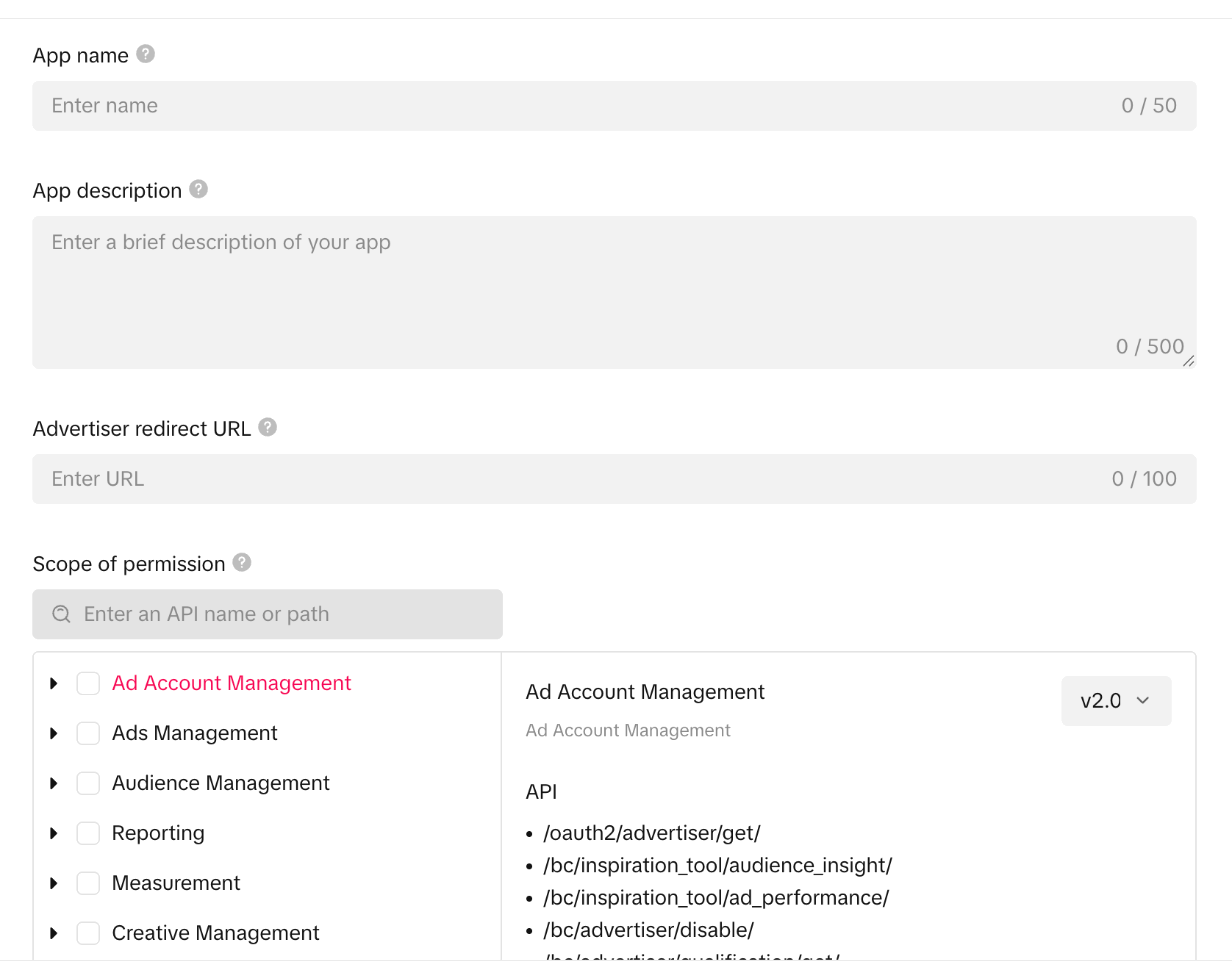
The Create New App dialog has four fields, each with its own character limit — app name 50, app description 500, advertiser redirect URL 100 — plus the permission picker:
3. Write the app description
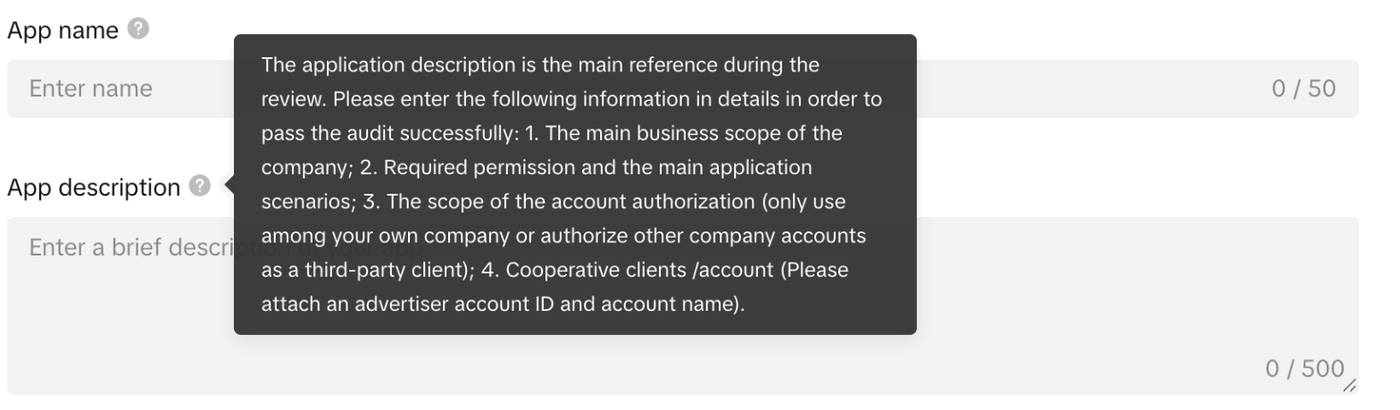
This field causes more rejections than anything else on the form. TikTok calls it, in the field's own help text, "the main reference during the review" and asks for four things:
- 1.The main business scope of the company
- 2.Required permission and the main application scenarios
- 3.The scope of the account authorization — own company accounts only, or third-party client accounts
- 4.Cooperative clients / account, attaching an advertiser account ID and account name
You have 500 characters for all four. That constraint is the reason the cheaper fix for a scope mismatch is usually to request fewer permissions rather than to write more.
The rule that matters most: every permission category you request must be named in the description. The reviewer reads the description, compares it against the permission list, and rejects the application on any gap.
Replace every [bracketed] placeholder below with your own details before
submitting. Structure it as what the product does, then an explicit capability list naming each
permission family, then how access is isolated and audited, then the client reference if you need one.
[YOUR COMPANY] is [a marketing agency / a technology company] operating [YOUR PRODUCT], used by our [team] to manage advertising for accounts we are authorized to manage.

Intended uses: we integrate the TikTok API for Business to [read campaign, ad group and ad structure], [retrieve performance reporting], [upload creative assets] and [manage campaign operations]. These functions technically require the [NAME EACH PERMISSION SCOPE YOU SELECTED] permission scopes.

Developer app access controls: access is limited to [our own organization's accounts / advertiser accounts that have explicitly authorized our app]. Each client's data is kept separate, actions are performed only on the authorized advertiser account, and activity is logged for review.

Cooperative client: [CLIENT NAME], advertiser account ID [ADVERTISER ID], authorized us to manage their TikTok advertising.
Keep it accurate rather than ambitious. Describing capabilities you have not built invites a scope mismatch in the other direction.
4. Choose the permission scopes
The permission scopes determine which API endpoints your app can reach. Selecting a category shows the exact endpoint paths it covers, which is the fastest way to check whether you actually need it. The current categories are Ad Account Management, Ads Management, Audience Management, Reporting, Measurement, Creative Management, App Management, Pixel Management, DPA Catalog Management, Reach & Frequency, Lead Management, TikTok Creator Marketplace (TCM), TikTok Creator, Ad Comments, TikTok Business Plugin, Automated Rules, TikTok Accounts, Onsite Commerce Store, Offline Events Management, Ad Diagnosis, Mentions, CRM Event Management, Business Recommendation, CTX Events Management, Brand Safety, Partner Insights, Payment Portfolio, Custom Conversion Management, Minis Management and Business Verification — thirty in total.
The portal states the rule directly on the field:
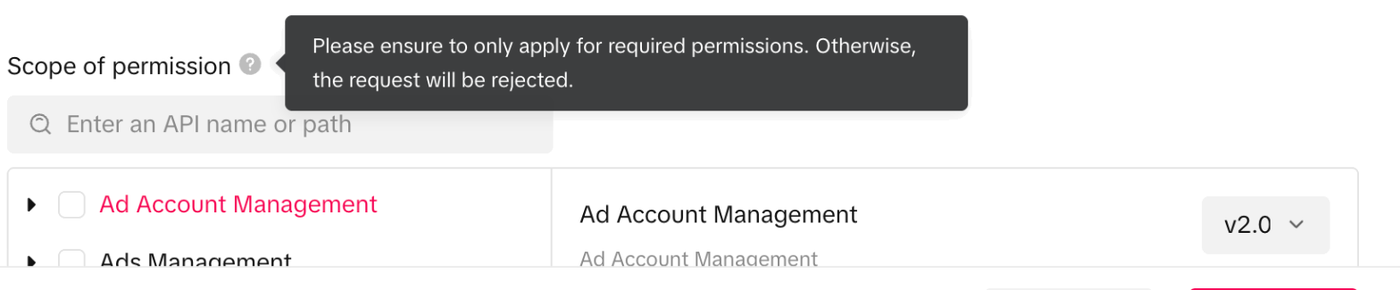
- ✓Request only the categories you have actually implemented today.
- ✓Leave roadmap features out — scopes can be added later without creating a new app.
- ✓Make sure every category you tick appears in the description.
To widen scopes later, TikTok documents a self-service path: open My Apps, select the app, open Scope of permission, edit the selection, and give a reason that aligns with the newly selected scopes. No new application and no support ticket are needed, and TikTok states the review takes two to three business days.
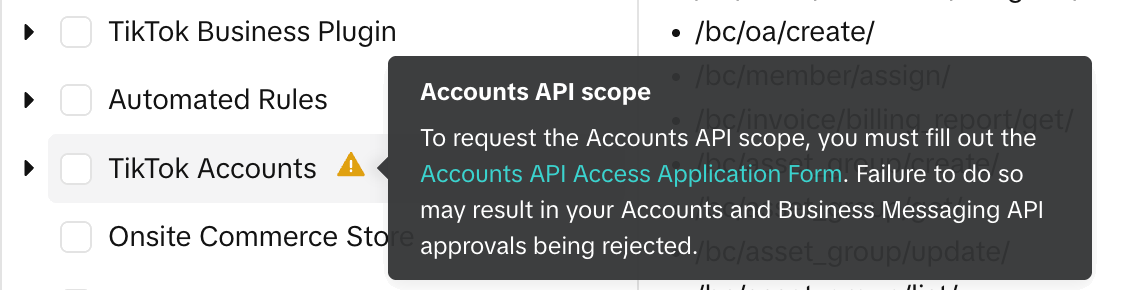
Special case — the TikTok Accounts scope. TikTok's create-a-developer-app documentation states that starting 20 March 2026 the Accounts API Access Application Form must be completed before you submit a new developer app or request a scope increase that includes TikTok Accounts. It must be submitted under the same email address as your developer profile. If organic account features are not part of what you are building, leave this category unselected and the form does not apply.
TikTok Accounts is the only category carrying a warning marker in the picker, and its tooltip links straight to the form:
5. Set the advertiser redirect URL
After an advertiser approves the authorization, TikTok redirects them to this URL with the authentication code appended. TikTok's documentation states you can configure up to 10 advertiser redirect URLs, including localhost, and that adding one lets you generate a new advertiser authorization URL.
For a live integration, prefer a production HTTPS URL that the advertiser's browser can actually reach.
Redirect URLs are matched exactly — any difference between the configured value and the one your
authorization request sends produces a redirect mismatch error, usually surfaced as
Redirect Url Not Match.
6. Reference a cooperative client
Where the description asks you to name the clients or accounts you work with, the reference has to be a genuine third-party client account — not one your own agency owns. An account already in Approved status is a stronger reference than one still in review.
You will find these under Business Center → Accounts → Advertiser accounts. The Owner column is what distinguishes an agency-owned account from a client-owned one, and the Status column is where you confirm the account is Approved rather than still in review.
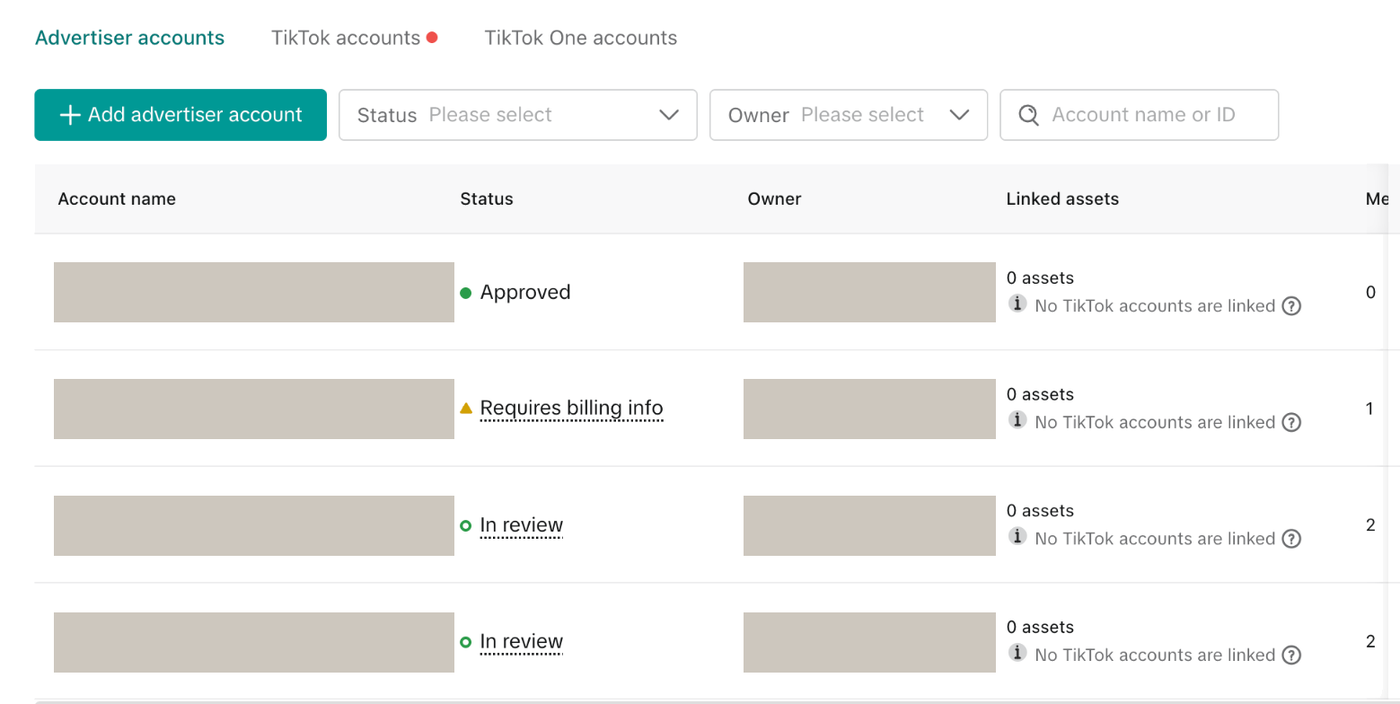
The client does not have to sit in the same Business Center as your app. If you run several Business Centers, the account you reference can live in a different one from the developer app. The field asks only for an advertiser account ID and account name — there is no requirement that the two share a Business Center.
Get the client's permission before naming them or their advertiser account ID in an application to TikTok. The account belongs to them, not to you.
7. Submit and wait
Select every permission you need, then click Submit at the bottom of the dialog. TikTok states the review may take two to three business days.
To check progress, open My Apps and look at Verification Status. The status moves from Pending to either Approved or Rejected. If it is rejected, the reason appears at the top of the Edit App screen — edit the request and submit it again. A rejection does not mean starting over with a new app.
Budget for more than one round. Each resubmission starts a fresh review, so the published two-to-three-day window applies to each attempt, not to the whole journey. Two rejections means three review cycles. Plan the calendar around the number of rounds you might need, not a single window.
8. What approval looks like
Three things exist only after approval, and are blank before it:
- ✓The App ID is issued
- ✓The App Secret is generated
- ✓The Online toggle becomes enabled
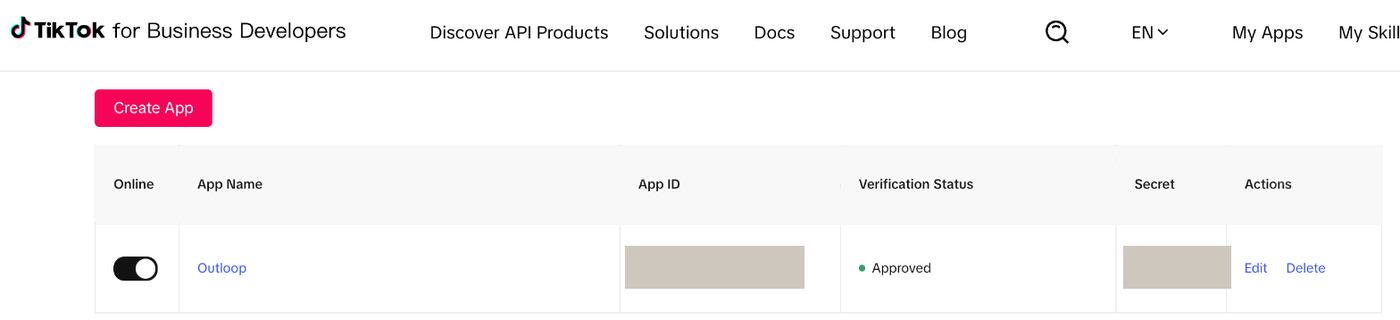
Treat the App Secret as a credential from the moment it appears. Put it straight into a secure credential store — never into source code, a repository, a ticket, a screenshot, or a chat message.
With the app approved, the authorization code flow gets you a long-term access token for the advertiser accounts that authorize your app.
Troubleshooting rejections
Work from the most likely cause down. Both messages below are TikTok's own wording, quoted so they are searchable.
"…no corresponding submission of the Accounts API Access Application Form was found under your developer profile's email address."
- →Submit the Accounts API Access Application Form using the same email address as your developer profile — a form filed under any other address will not be found.
- →Or remove the TikTok Accounts scope and resubmit. TikTok's warning notes this requirement can also affect Business Messaging API approval.
"Your description of using TikTok's API for Business product doesn't align with your scope of permission."
- →List the permission categories you selected, then read your description and check each one is named and justified.
- →Close the gap from whichever end is cheaper — expand the description, or drop the scopes you cannot yet justify and add them later through the self-service scope increase.
"You cannot create an app while your developer profile is rejected."
- →This reflects a documented precondition: the developer profile must be approved before a developer app can be created. Fix the profile first — the company-domain email and the company website rules are the usual causes.
- →We have also seen this message persist next to an already-corrected profile and clear itself once approval came through. If your profile is genuinely approved, re-check before assuming a profile-level block.
Official documentation
TikTok decides all outcomes, and its documentation is the authority. These are the pages this guide draws on:
Outloop is an independent tool and is not affiliated with or endorsed by TikTok. Approval outcomes and review timings are decided and published by TikTok; this guide does not guarantee approval. Questions about this guide: support@outloop.co.
Run client AI workflows without handing over API keys.
Outloop is available with setup guides and product support for AI agencies, operators, and dev shops.