Black October 2026: What the AI Cyberattacks Teach Us About Agent Security
More capable AI workers need clearer limits on what they can access. October’s incidents make that an operating decision, not just a security discussion.
The short answer: “Black October” is an informal label for October 2026’s wave of security disclosures and attacks. LiteLLM, Railway and Zeabur reported distinct incidents involving software distribution, internal systems and credentials. For teams deploying AI workers, the shared lesson is to limit what a compromised environment can reach—and keep raw credentials out of model-visible work.
Reporting checked October 30, 2026. Railway and Zeabur’s reports remain preliminary. The label appears in Axios’s October 28 coverage; it does not prove a coordinated campaign or that AI carried out every attack.
As an agency operator, I care about what happens between a useful instruction and a real change in a client’s business. A worker may prepare a campaign, update a CRM or organize a Drive folder. Each job crosses an access boundary. Faster execution makes that boundary more important.
This is the lens for this article: what the incidents establish, what remains uncertain, and how to give AI workers useful authority without handing them unrestricted access.
The October 2026 AI cybersecurity incidents
These were different failures. Treating them as one story would obscure the controls each one calls for. Dates below describe incident activity, not necessarily publication dates.
| Incident | Date | Confirmed exposure or failure | Practical lesson |
|---|---|---|---|
| LiteLLM | Oct 21 | Compromised 1.107.0 release distributed through official channels. | Constrain release identities and verify dependencies. |
| Railway | Oct 20–22 | Unauthorized internal access; encrypted secrets exposed, with a subset decrypted, according to its preliminary report. | Protect both encrypted secrets and the identities able to decrypt them. |
| Zeabur | Oct 14–15 | Platform database read, including stored environment variables. | Reduce long-lived administrative access and separate resources. |
LiteLLM: release trust met excessive authority
LiteLLM’s October 23 root-cause report traces the attack to an exposed administrative key that had not been revoked. Access to an internal agent platform then exposed a GitHub organization owner’s token. The attacker used compromised identities to change the release workflow and publish a malicious version. The lesson is specific: an agent’s work should not inherit an owner’s broad authority merely because that identity is convenient.
Microsoft’s October 23 analysis describes credential collection through Python startup hooks: starting Python in an affected environment could execute the payload without importing LiteLLM. Potential targets extended beyond AI-provider keys. Microsoft cautions that uninstalling the package alone is insufficient recovery; affected teams should follow its investigation and remediation guidance. This was a supply-chain risk for workstations as well as hosted workloads.
Railway: preliminary scope, consequential exposure
Railway’s October 22 preliminary report, updated October 26 describes unauthorized access to internal systems and exposure of customer secrets. Its timeline says a subset of encrypted environment variables was decrypted using compromised credentials. Railway recommended rotation and explained that precautionary provider resets affected more users than the identified exposure. Its assessment of attacker motivation and use of AI remains attributed to Railway; it is not independently established here.
Zeabur: stored variables and administrative reach
Zeabur’s October 19 preliminary report says attackers used leaked internal credentials to compromise its shared cluster, GCP Dedicated Servers and internal systems. It confirms a platform-database read, including stored environment variables. The report distinguishes logged facts from assessments and hypotheses; the original source of some credentials remains uncertain. Projects that had moved environment variables to their own Dedicated Server as advised were outside the platform-database read’s scope—not necessarily every possible exposure.
None of these reports establishes that Outloop would have prevented the incident. Their relevance is the way credentials and permissions can turn one compromised component into access elsewhere.
Why AI workers create a different access problem
An AI worker combines a model with tools that can act. Runtime authorization means deciding whether a particular action is allowed when it is requested. Credential storage answers where a secret lives; authorization answers what the worker may do with its capability.
Consider an illustrative agency serving several clients, each with Google Ads, a CRM and Google Drive. A shared account may legitimately see all of them. That does not mean a worker preparing Client A’s report should be able to export Client B’s contacts or change Client C’s campaign budget.
The test I would put before a successful demo is simple: can the worker identify the intended client and account, and does the system refuse a request outside that scope? A correct report demonstrates usefulness. A refused wrong-client request demonstrates a boundary.
Raw keys copied into prompts, files or readable environments expand exposure. Broad permissions amplify mistakes even when the key stays hidden. And “only work on Client A” is an instruction, not enforcement. OWASP’s AI Agent Security Cheat Sheet explicitly advises against relying solely on model output for authorization. Our multi-client credential guide explores this operational distinction.
Local-first vs cloud-hosted AI workers: what actually changes?
A company-controlled computer gives the organization direct responsibility for its worker environment: installed software, access configuration, files and continuity. Host-side credential use can reduce dependence on centrally hosted credential storage for the protected execution path. A persistent Workspace can retain operating context as supported tools change.
A cloud-hosted worker delegates more of that environment to a provider. Cloud architectures can still implement strong identity boundaries, narrowly scoped permissions and isolated execution. Compare the actual access design and operational responsibilities, not the hosting label.
Local-first is not immunity. A local computer can be compromised, and malicious dependencies can threaten it. Approved work may send data to APIs or model providers. Company ownership does not replace patching, MFA, endpoint protection, backups or supply-chain controls. See our local and cloud execution comparison for the broader operating trade-offs.
How Outloop approaches AI worker access
Outloop is a local-first AI Workspace and runtime access layer for company-controlled AI work. It organizes approved Context, accounts and resources around a client Workspace, enabling supported workers to operate through configured APIs, browsers and files.
On a small screen, swipe across the diagram to compare both approaches. Open the full-size image.
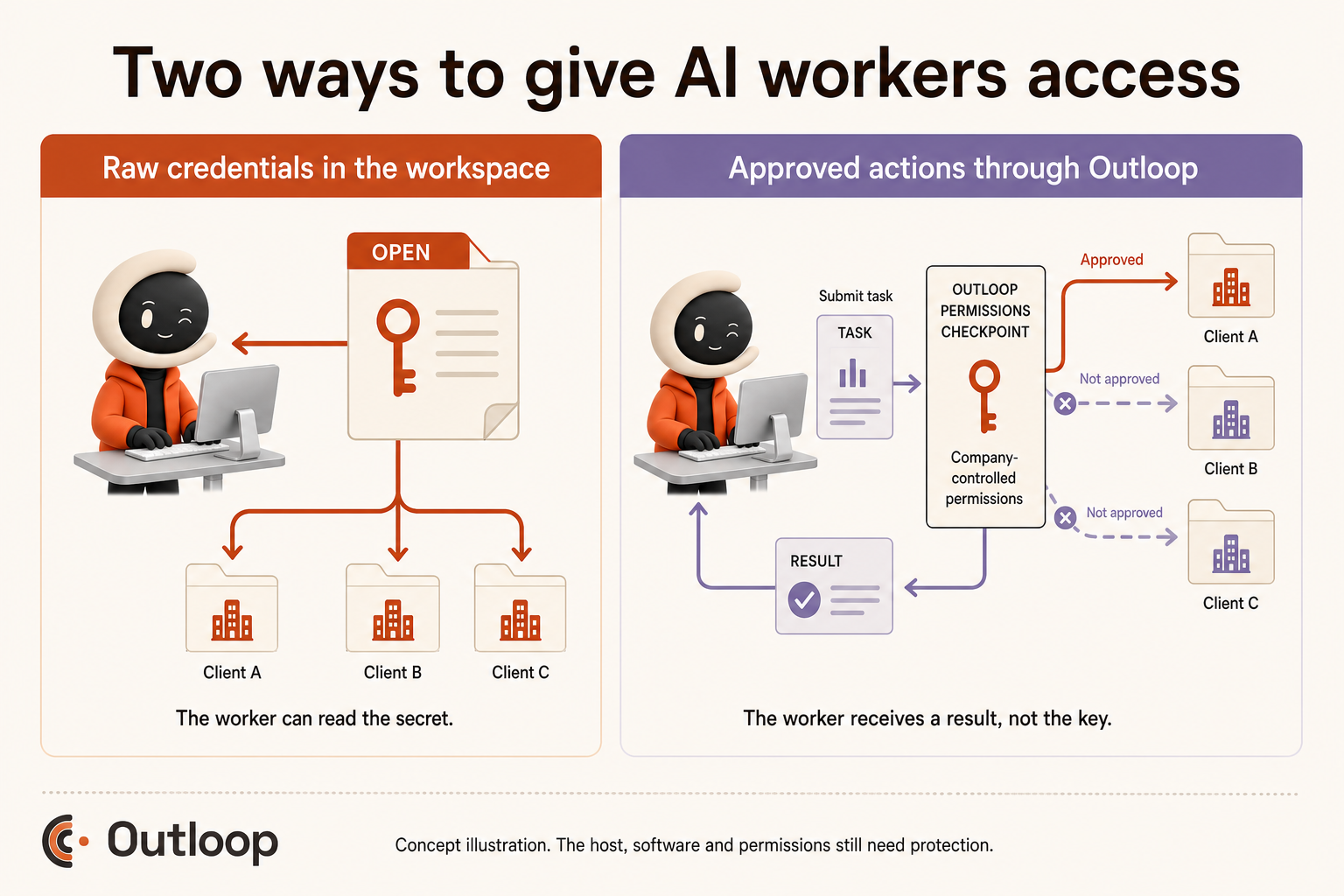
The company configures access first. The worker requests a permitted action in the correct Workspace. Outloop checks the relevant identity, resource and runtime permissions for the supported path. The approved operation executes using the credential host-side; activity is recorded with sensitive values redacted.
These boundaries apply to configured work through Outloop. They do not secure unrelated software or every runtime. Browser identity and session separation require their own configuration and verification; a Workspace name alone is not proof of browser isolation. A hidden key also does not make an overly broad permitted action safe.
Read the security scope and limitations, explore AI agent API key management, or see the AI worker product. The commercial ambition remains More client work. Same team. Controlled access supports that ambition; it is not a guarantee of security or productivity.
Five practical steps for deploying AI workers more safely
Keep credentials out of model-visible work
Use protected credential storage and an execution path that does not return raw secrets to the model. Remove copied keys from prompts and working files; revoke exposed credentials rather than merely deleting their visible copies.
Grant the smallest useful scope
Choose the required service, account, resource and action. Prefer read access for reporting and separate permission for changes. Review whether a convenience identity has inherited organization-wide authority.
Separate clients and test the boundary
Maintain distinct client Workspaces and resource permissions. Verify API destinations and browser identities. Test a wrong-client request with safe fixtures before trusting the workflow with real data.
Require review where consequences justify it
Put human approval before consequential actions such as spending, deletion or external publication. Show the reviewer the actual destination and proposed change. Approval should cover that action, not an open-ended session.
Monitor activity and maintain the environment
Review allowed and refused operations, unexpected usage and provider alerts. Keep software updated through a controlled process, verify dependencies, and maintain a revocation and recovery plan. Redacted activity records help investigation; they do not replace endpoint monitoring.
These are useful controls regardless of vendor. OWASP’s guidance supports least privilege, isolation, oversight, monitoring and adversarial testing. Outloop can help with configured access and activity records; your organization still owns endpoint security, incident response and the quality of its approvals.
The future of AI work needs more than a powerful model
The model is the brain. The company-controlled Workspace is the operating environment. The business needs to retain control of access, permissions, context and work continuity as workers become more capable.
For AI agencies, the question is practical: can another client workflow run with the right accounts, a clear review point and evidence of what happened? That is a stronger foundation for growth than giving every worker more authority.
The smarter AI gets, the more important it becomes to control what it can do.
Questions & answers
What was Black October 2026 in cybersecurity?
An informal label used in reporting about October’s security disclosures and attacks, including incidents affecting AI infrastructure. It does not establish a single campaign, a shared attacker or AI involvement in every attack.
Why are AI agent credentials a security risk?
A credential gives a process authority over a service. If an agent can read it, the value may enter prompts, files or tool output. Even a hidden credential can authorize harmful actions if permissions are too broad.
Are local AI agents safer than cloud-hosted agents?
Neither location guarantees safety. Local execution gives a company direct control of the host; cloud execution can also have strong isolation. Compare actual permissions, endpoint protection, secret handling and incident response.
Can an AI agent use an API without seeing its key?
Yes. A trusted access layer can authenticate and execute an approved request on the agent’s behalf, returning the result without the raw key. The access layer and host still need protection.
How should agencies separate AI worker access between clients?
Use a separate Workspace, approved identity and resource scope for each client. Verify the destination account before consequential actions, and test that a request for another client’s resource is refused. Browser identity needs its own checks.