Learn · Troubleshooting
Claude scheduled task says it succeeded but nothing happened? Fix cloud vs local access
Last updated:
By Adam Argaman, founder of Outloop · Anthropic documentation and GitHub issue states verified on September 29, 2026 · Outloop is not affiliated with Anthropic.
In short
When a task changes execution environment, check whether it can still reach every dependency it needs.
A green session status does not prove the requested artifact was produced. Check local dependencies, the product’s current scheduling options and the actual output. Our September recovery used a task bound to the computer; the October documentation change means that remedy is version-specific. Verify both a manual run and a scheduled run.
How to read this page
Every claim carries its evidence level: Anthropic docs We observed User reports Open question
Am I affected?
You are probably affected if a scheduled task that used to produce files, messages or records on your computer still shows successful runs, but the output stopped appearing around the time Claude moved sessions to the cloud.
| Symptom | Likely cause | Check |
|---|---|---|
| Run shows success, expected file or record is missing | The task ran in a cloud sandbox without your local folder or tools | Open the run transcript; look for missing-folder, missing-tool or skipped-step messages |
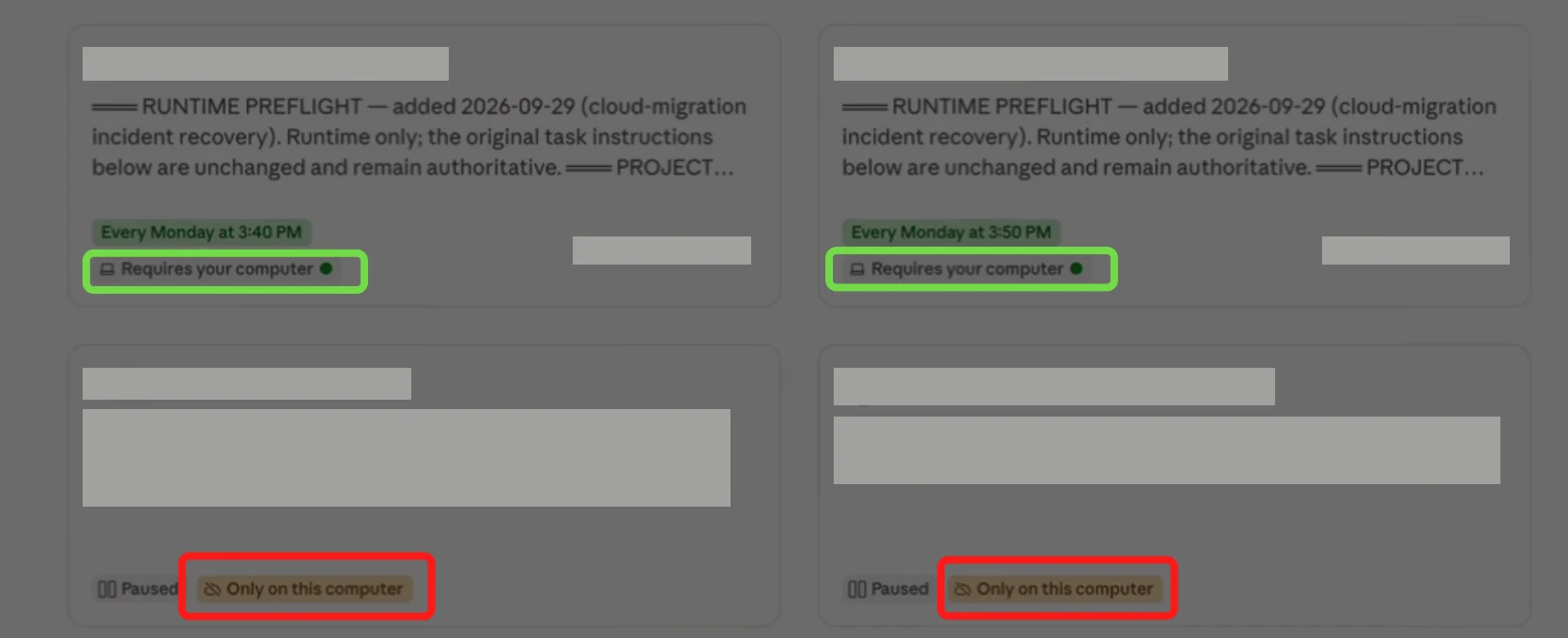
| Task badge reads "Only on this computer" (orange) | Observed in our incident and reported in #97009: these tasks may not run even though they are set to this computer | Recreate the task with Require this computer on; the badge should read "Requires your computer" (green) |
| Transcript says no folder is connected | No local folder attached to this task, or the run was not on your computer | Edit the task and inspect the Folder field; check where it runs |
| Local MCP tool "not found" / not loaded | Local MCP servers work through the desktop app only | Is the task bound to this computer, and is the app open? |
| Browser step silently skipped | Browser use needs the desktop app, open and connected | Same as above; confirm Claude in Chrome is reachable |
| Run marked "Skipped" | Computer asleep, previous run still going, or other tasks running — or, per user reports, a masked launch failure | Hover the skipped entry for the reason |
| Output appears only when you click Run now | A manual run proves the prompt, not the timer | Verify the output of one timed run, not only Run now |
The fastest check is the badge on each task in the Scheduled list. We observed In our recovery, two badges that both sound local behaved differently:
What changed?
Cowork scheduled tasks moved from running on your computer to running on Anthropic's servers.
Anthropic docs
"Scheduled tasks run remotely, so they run on their cadence even when your computer is asleep or the Claude Desktop app is closed." — Schedule recurring tasks in Claude Cowork
"Note: If a scheduled task requires local files or apps, it will only run locally." — same page
That second sentence describes the intended routing. In practice, tasks created before the change, and tasks whose local dependency is not explicit in their configuration, may now run in the cloud. User reports One report describes an app update that turned a "Run new tasks in the cloud" setting on by default, so a local agent "silently started as a remote/cloud session" (#75700).
What does "This project has moved to the cloud" mean? Open question We could not find that message in Anthropic's documentation as of September 29, 2026. Read it as a prompt to check where every scheduled task in that project now executes — the documented change is that sessions run remotely and projects created in Cowork are saved to your Claude account, while "projects you create from a folder on your computer stay on that computer."
Why does Claude say a scheduled task succeeded when nothing happened?
Because the run status describes the session, not the outcome of your instructions.
Anthropic docs Anthropic states this directly for Claude Code routines:
"A green status in the run list means the session started and exited without an infrastructure error. It does not mean the task in your prompt succeeded. […] Blocked network requests, missing connector tools, and task-level failures all surface there rather than in the status indicator." — Claude Code docs, Routines
The Cowork documentation does not carry an equivalent warning, but the same logic applies: a cloud run
that finds no local folder can report the problem in its transcript, stop, and exit cleanly.
User reports Public reports describe runs marked
succeeded that did nothing (#91095,
#95272).
We observed In our own incident, scheduled runs were marked as
successful while the output they were supposed to produce was absent.
Can Claude scheduled tasks access local files, local MCP servers or the browser?
Only when the task runs on your computer with the desktop app open. A cloud run cannot reach them.
Anthropic docs
"A cloud session can read and write files in folders you've connected on your computer only while the desktop app is open on that computer and the session was started on desktop. If the app is closed, the session keeps running but can't reach your local files. […] Local connectors and plugins that include local MCP servers work through the desktop app only." — Use Claude Cowork on web, desktop, and mobile
| Needs | Cowork cloud scheduled task | Task bound to your computer | Claude Code cloud task |
|---|---|---|---|
| Runs while your computer sleeps | Yes | No — the run is skipped | Yes |
| Local folders | No — a task that requires local files “will only run locally” | Yes, the folders you allowed | No (fresh clone) |
| Local MCP servers | No — desktop app only | Yes | No — cloud connectors only |
| Browser / Claude in Chrome | No — browser use works through the desktop app | Yes | Not documented |
| Local bridges and tools on the Mac | Not reachable from the cloud sandbox (inference) | Yes | Not reachable (inference) |
Broken — silent
- Cloud scheduler fires
- Cloud sandbox session starts
- Local folder · browser · local MCP · local bridge not reachable
- Session exits cleanly → “Succeeded”, no real output
Working — verified
- Scheduler fires a device-bound task
- Runs on your Mac (awake, desktop app open)
- Preflight: project folder · browser · local bridge →
PREFLIGHT_OK - Real output written and downstream effect verified
How do I verify whether a scheduled task actually ran?
Verify the effect, not the status. Work down this ladder until you reach evidence the task could not have produced without doing the work.
- Run status — tells you the session ended. Weakest evidence.
- Run transcript — read what Claude says it could and could not reach. Missing folders and tools show up here.
- A status file written by this run — e.g.
PREFLIGHT_OKplus a timestamp matching the run (see the template below). - The output artifact — the report, export or file, with a modified time from this run and plausible content.
- The downstream effect — the record, message or API request logged by the system the task was meant to change. Strongest evidence.
When you check a timed run, allow for a few minutes of drift: the app's settings note says "scheduled tasks use a randomized delay of several minutes for server performance."
If the task uses local bridges or APIs, the downstream system's own log is the cleanest proof. For example, when a task calls APIs through a local runtime access layer such as Outloop, each request appears in a local audit log with its own request ID — so "did this run really call the API from this computer?" becomes a yes-or-no lookup instead of a guess.
Step-by-step recovery
Do not edit or delete the old tasks first. Build and prove replacements alongside them.
- Inventory. List every scheduled task, where it runs, and what it depends on locally: folders, local MCP servers, browser sessions, local bridges, CLI tools.
- Capture the current schedule from the Scheduled tasks screen. Treat the UI as authoritative; times written inside old instructions may be stale.
- Copy each task's original instructions verbatim into a safe place before changing anything (see below).
- Create a new task manually with the computer requirement on and the exact local folder selected. Paste the original instructions unchanged, with a preflight block added at the top.
- Save, reopen Edit, and check the Folder field. In our testing a project association alone did not attach the local folder. In the Scheduled list, the badge should read Requires your computer, not Only on this computer.
- Run now once, under the safe Run now policy, and verify real output.
- Let one scheduled run fire and verify its output and downstream effect.
- Pause the old task only after step 7, and delete it only when the cutover row says it is safe.
What does "Require this computer" do, and how do I make a task use my Mac?
It binds a scheduled task to one computer so it runs there with that computer's folders and browser — but only while that computer is awake.
Open question We could not find the setting in Anthropic's documentation as of September 29, 2026. User reports The app's own tooltip, quoted in a public report, reads: "Only runs while your computer is awake. Gives Claude access to the folders you've allowed on this computer and to Claude in Chrome." The same report shows the toggle disabled on an existing task with the tooltip "To require this computer, create a new scheduled task," and says tasks created by an agent cannot be device-bound at all (#92268). Task badges seen in reports include "Only on this computer" and "Requires your computer" (#97009).
“Only on this computer” is not the same as “Require this computer”
We observed Open the settings of each kind of task and the difference shows. The old, project-bound task has an Only on this computer toggle marked Advanced and locked on, with the note "This task uses a project on this computer, so it can only run here. To use the cloud, create a new task without it." Those tasks stopped producing output after the cloud move. The recreated task has a Require this computer toggle that you switch on yourself, and it explicitly grants the allowed folders and Claude in Chrome.


User reports Another user describes the same split in #97009: project-bound tasks badged "Only on this computer" failed to run, while a control task created manually and badged "Requires your computer" ran on schedule. We have not seen an explanation from Anthropic, so treat this as a pattern to check, not a rule.
Anthropic docs For tasks on your machine, the Claude Code documentation is explicit: they "only run while the desktop app is running and your computer is awake. If your computer sleeps through a scheduled time, the run is skipped." Enabling Keep computer awake prevents idle sleep, but "closing the laptop lid still puts it to sleep." A device-bound task therefore belongs on a machine that stays on — which is why teams running scheduled client work often give agents a dedicated machine instead of a laptop.
Our first-workspace guide shows the full setup of a device-bound task with a local folder, including a recording of a run that stopped because no folder was attached.
Recovering the original scheduled-task instructions
Recreate from the exact original text. Do not let an agent "tidy up" the prompt during recovery.
- →Open each old task and copy its full instructions into a plain-text file, one file per task, before editing anything.
- →Record the schedule, model, permissions and project exactly as the Scheduled tasks screen shows them today.
- →Preserve the business logic word for word. Add only the preflight block; any other improvement is a separate, later change.
- →Create the replacement manually rather than asking an agent to create it — users report agent-created tasks cannot be bound to the computer.
Runtime preflight template
Put this at the top of every scheduled task that depends on your computer. It turns a silent environment failure into an explicit, visible one.
Replace the angle-bracket values. It works with or without Outloop.
RUNTIME PREFLIGHT — do this before any other work.

1. Folder: confirm <PROJECT_FOLDER> exists on this computer and list one known file in it.
2. Write access: create and delete a marker file in <OUTPUT_FOLDER>.
3. Local tools: confirm each required local tool or MCP server responds: <TOOL_LIST>.
4. Local bridge: make one read-only health check to <LOCAL_BRIDGE> and record its request ID.
5. Browser (only if needed): confirm the browser is reachable and signed in to <SITE>. Never sign in yourself.

If ANY check fails:
- write "PREFLIGHT_FAILED: <which check>" and the time to <OUTPUT_FOLDER>/run-status.md if you can,
- do no other work, make no external changes,
- start your final message with "FAILED:".

If all checks pass, write "PREFLIGHT_OK" and the time to <OUTPUT_FOLDER>/run-status.md, then continue.

At the end, append to run-status.md: terminal_status (COMPLETED / PARTIAL / FAILED),
the artifacts written in THIS run, the number of items processed, and any blocked lookups.
Never reuse an earlier run's output as evidence for this run.
Safe "Run now" policy
Run now executes the real instructions, including sends and writes. Use it as a diagnostic, not as proof of the schedule.
- →Never let the old and new task act on the same downstream system in the same window. Duplicate emails, messages and CRM writes are the most likely damage in a recovery.
- →For tasks with external side effects, run a dry run first — add "DRY RUN: do not send or write; report what you would do" for the first manual run.
- →One task at a time. Verify its output before starting the next.
- →Run now proves the prompt and the environment of that run, not the timer. Always follow with one verified scheduled run.
Cutover checklist
One row per task. The old task is only safe to delete when every column to its left is verified.
Download the checklist (CSV) — opens in Google Sheets, Excel or Numbers — or copy the Markdown version:
| Old task | Replacement task | Instructions recovered | Schedule matches UI | Runs on this computer | Folder attached | Preflight OK | Run now verified | Scheduled run verified | Downstream verified | Old task paused | Safe to delete old |
|---|---|---|---|---|---|---|---|---|---|---|---|
|  |  |  |  |  |  |  |  |  |  |  | NO |
How to prevent silent failures
- →Make every local dependency explicit: bound to the computer, folder attached, preflight at the top.
- →Define success as an artifact or downstream effect from this run, never as a green status.
- →Have each run write a status file you (or a watchdog task) can check.
- →After every Claude Desktop update, check where your scheduled tasks execute and read one transcript per task.
- →Run device-bound tasks on a machine that stays awake with the desktop app open.
- →Keep an inventory of scheduled tasks and their local dependencies, so the next migration is a checklist rather than an investigation.
Known limitations and open issues
User reports These are public reports in Anthropic's
claude-code repository, not confirmed product behavior. Apart from one issue closed by a repository collaborator as a duplicate, we found no maintainer response
on them. States as of September 29, 2026 — check the links for the current status.
| Issue | Reported problem | State · opened |
|---|---|---|
| #92268 | Agent-created scheduled tasks can never be device-bound; "Require this computer" cannot be enabled afterwards | Open · Sep 5, 2026 |
| #97009 | Project-bound scheduled tasks fail to spawn ("Failed to run scheduled task") | Open · Sep 25, 2026 |
| #94411 | Windows: task with a folder + "Require this computer" will not save with one model selected | Open · Sep 15, 2026 |
| #75700 | Cowork silently moved a long-running local agent to the cloud | Closed as duplicate · Jul 8, 2026 |
| #96187 | Automatic update moved sessions to the cloud; file tools act on copies | Open · Sep 22, 2026 |
| #95663 | Task created from a pre-migration session can never launch; shown as "Skipped" | Open · Sep 20, 2026 |
| #95272 | Local scheduled task collects nothing and the dead run reports succeeded | Open · Sep 18, 2026 |
| #91095 | Scheduled task fires, session never executes, run reported SUCCEEDED after 12s | Open · Aug 31, 2026 |
| #76968 | Cowork sessions can no longer manage local scheduled tasks | Open · Jul 12, 2026 |
| #43397 | Cloud scheduled tasks cannot access MCP connectors | Closed as not planned · Apr 4, 2026 |
Our incident, September 2026
We observed We run scheduled client-operations tasks on a dedicated Mac: intake, watchdog and reporting jobs that read a local project folder and call APIs through a local bridge. After the move to cloud execution:
- →scheduled runs were marked as successful while the output they were supposed to produce was absent;
- →the affected tasks carried the orange Only on this computer badge — set to run locally, yet not producing output;
- →we recovered each task's original instructions and the current schedule from the Scheduled tasks screen, and recreated the tasks with Require this computer switched on (green Requires your computer badge) and the local project folder attached;
- →one rebuilt task — an email-intake job — has been verified end-to-end on a manual run: the local project folder and local bridge were reachable, its skill loaded, it scanned its full mailbox window, wrote real output artifacts, ended with
terminal_status: COMPLETED, and had no blocked lookups and no unintended side effects; - →the other rebuilt tasks are pending verification, and their old versions stay in place until each replacement shows real downstream output.
We will update this section as more replacements are verified. What we can say today is narrow and specific: the fix works for the task we have verified, and a green status told us nothing either way.
Sources
Anthropic documentation re-read from the live pages on September 29, 2026. The Help Center shows only relative update dates, and these products change quickly — check the primary sources if you are reading this later.
- →Anthropic Help Center — Schedule recurring tasks in Claude Cowork
- →Anthropic Help Center — Get started with Claude Cowork
- →Anthropic Help Center — Use Claude Cowork on web, desktop, and mobile
- →Anthropic Help Center — Organize your tasks with projects in Claude Cowork
- →Claude Code docs — Desktop scheduled tasks
- →Claude Code docs — Routines (run status vs task success)
- →GitHub issues: see the table above.
Related: Claude Cowork vs Claude Code, cloud agents vs dedicated machines, set up your first Outloop workspace, and what is agent runtime access?
Make local execution observable
Outloop runs on the Mac where your agents work. Scheduled tasks call approved APIs through it without seeing the credential, and every request lands in a local audit log — so you can prove a run happened.
Start 14-day trialClaude, Claude Code, Claude Cowork and Claude in Chrome are products of Anthropic. Outloop is an independent product and is not affiliated with or endorsed by Anthropic.