
What’s the difference?
Zapier MCP
App actions
- →AI clients call app actions on request
- →your existing Zapier app connections
- →choose apps and actions; approve or block
- →every action in the History log
Outloop
The AI worker’s computer
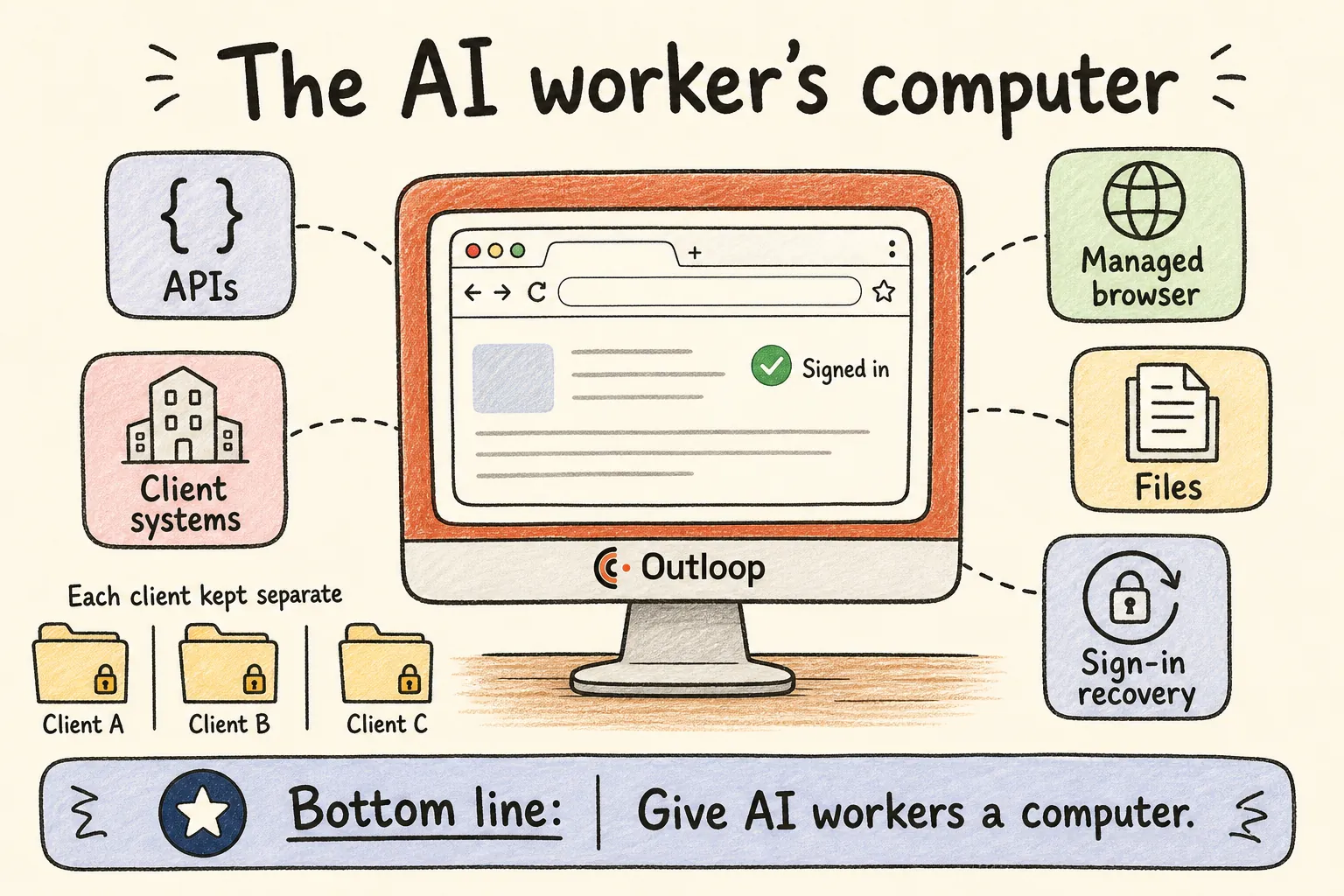
- →a controlled computer for the AI worker
- →approved APIs, a managed browser and files
- →sign-in recovery with Keychain-held logins
- →one workspace per client, pinned to its accounts
- →reviewed learning the next run can reuse
An app action is one step. Client work is the whole job — the API call, the portal login, the download, the file work, the upload and the review. Outloop is built so the AI worker can do all of it from one place.
Outloop vs Zapier MCP, side by side
| Dimension | Zapier MCP | Outloop |
|---|---|---|
| Core product | MCP access to Zapier’s app actions across 9,000+ apps — 30,000+ actions per its landing page, 40,000+ per its docs | AI workstation infrastructure: a controlled computer environment for AI workers on a Mac you control |
| Best for | On-demand actions from an AI chat or agent — send an email, update a sheet, post a message. Trigger-based workflows built through MCP are in early access (Next Gen Zaps) | End-to-end client workflows that cross APIs, websites, files and several client accounts |
| Where work happens | Inside Zapier app actions, called from your AI client | On the AI worker’s own computer — approved APIs, a managed browser, files and client systems in one workflow |
| Browser and website work | Not described on Zapier’s MCP page or docs overview; work runs through app actions | Managed Browser on your Mac; each active task gets its own tabs so tasks don’t take over each other’s pages |
| Website sign-in | Not described on Zapier’s MCP page or docs overview | Browser Login: Outloop signs the browser back in with a login you approved; the password and code stay in the Keychain. Some sign-ins (CAPTCHA, passkeys, device prompts) still need a person |
| Session continuity | Not described on Zapier’s MCP page or docs overview | Changing keys, services or workspace access doesn’t close the browser or its signed-in sessions. Next release: after a mid-task sign-in, the agent continues on the same task page |
| File work | Handled inside individual app actions; no separate file layer is described on the MCP page or docs overview | Download from approved services, process locally, package, and upload back — without the agent seeing a credential |
| App connections | Zapier-managed connections; your existing Zapier connections are added automatically | Approved API access used host-side; the credential never enters the agent’s context |
| Human oversight | You choose apps and actions, approve or block actions, and every action is in your History log | Designed to reduce routine human intervention — no key hand-offs, sign-in recovery — with human review kept where you want it, plus a redacted local audit |
| Client isolation | Account-level restrictions, managed connections and workspace scoping; IT can enable MCP per workspace | One workspace per client, pinned to that client’s accounts and resource IDs; a request for another client’s resource is refused before any credential is read |
| Learning | Not described on Zapier’s MCP page or docs overview | Agent Learning: agents propose what they learned, you approve it, and approved know-how is reused on the next run |
| AI clients and runtimes | Claude, ChatGPT, Cursor and other AI tools, per Zapier | Claude Code, Claude Cowork, Codex, Hermes and OpenClaw — change the model or runtime and the workspace stays |
| Pricing unit | Included on all Zapier plans; each MCP tool call uses two tasks from your plan’s quota | Priced per client workspace — not per call |
| Security certifications | Zapier states SOC 2 Type II compliance | Makes no certification claim |
| Main outcome | Your AI can act in your apps | Your AI worker finishes the client job |
MCP access to Zapier’s app actions across 9,000+ apps — 30,000+ actions per its landing page, 40,000+ per its docs
AI workstation infrastructure: a controlled computer environment for AI workers on a Mac you control
On-demand actions from an AI chat or agent — send an email, update a sheet, post a message. Trigger-based workflows built through MCP are in early access (Next Gen Zaps)
End-to-end client workflows that cross APIs, websites, files and several client accounts
Inside Zapier app actions, called from your AI client
On the AI worker’s own computer — approved APIs, a managed browser, files and client systems in one workflow
Not described on Zapier’s MCP page or docs overview; work runs through app actions
Managed Browser on your Mac; each active task gets its own tabs so tasks don’t take over each other’s pages
Not described on Zapier’s MCP page or docs overview
Browser Login: Outloop signs the browser back in with a login you approved; the password and code stay in the Keychain. Some sign-ins (CAPTCHA, passkeys, device prompts) still need a person
Not described on Zapier’s MCP page or docs overview
Changing keys, services or workspace access doesn’t close the browser or its signed-in sessions. Next release: after a mid-task sign-in, the agent continues on the same task page
Handled inside individual app actions; no separate file layer is described on the MCP page or docs overview
Download from approved services, process locally, package, and upload back — without the agent seeing a credential
Zapier-managed connections; your existing Zapier connections are added automatically
Approved API access used host-side; the credential never enters the agent’s context
You choose apps and actions, approve or block actions, and every action is in your History log
Designed to reduce routine human intervention — no key hand-offs, sign-in recovery — with human review kept where you want it, plus a redacted local audit
Account-level restrictions, managed connections and workspace scoping; IT can enable MCP per workspace
One workspace per client, pinned to that client’s accounts and resource IDs; a request for another client’s resource is refused before any credential is read
Not described on Zapier’s MCP page or docs overview
Agent Learning: agents propose what they learned, you approve it, and approved know-how is reused on the next run
Claude, ChatGPT, Cursor and other AI tools, per Zapier
Claude Code, Claude Cowork, Codex, Hermes and OpenClaw — change the model or runtime and the workspace stays
Included on all Zapier plans; each MCP tool call uses two tasks from your plan’s quota
Priced per client workspace — not per call
Zapier states SOC 2 Type II compliance
Makes no certification claim
Your AI can act in your apps
Your AI worker finishes the client job
Zapier MCP column taken from zapier.com/mcp and docs.zapier.com/mcp, verified September 19, 2026. Outloop column reflects the current Stable release unless marked "next release".
A real workflow, end to end.
A monthly client report is not one app action. It is six steps across four different surfaces — and it only helps if the AI worker gets through all six without someone stepping in to paste a key or re-sign into a portal.
- 01 API
Collect the data
Pull the client’s numbers through approved API access.
- 02 Browser
Open the client portal
Signed in with an approved login — recovered if the session expired.
- 03 Files
Download the assets
Exports and creatives land on the AI worker’s computer.
- 04 Files
Build the PDF or video
The agent’s own tools process the files on that computer.
- 05 API + files
Upload to the client’s Drive
Only into the Drive approved for this client.
- 06 Human review
Send for review
A person approves before anything goes to the client.
With Zapier MCP, each step is an app action your AI asks for — where Zapier has an action for it. With Outloop, all six run on the AI worker’s own computer, inside the client’s workspace, with the approved access for that client and no one else’s.
Why client work needs a computer, not just actions
- →A real workstation, not only app actions. The AI worker has a place to work: a browser, files, approved API access and the client’s systems, all in one environment.
- →Websites are part of the job. Many client systems only exist behind a login. The Managed Browser and Browser Login let the AI worker use them — and get signed back in when a session expires.
- →Files are part of the job. Download, process, package and upload happen on the same computer, so a report or a creative doesn’t stop at the first attachment.
- →Built for many clients. Each client gets its own workspace, pinned to its own accounts and resources. A request for the wrong client is refused before any credential is read.
- →Less babysitting. No pasting keys, no re-signing into approved sites, no rebuilding access for every client. When a step genuinely needs a person — a CAPTCHA, a passkey, an approval you reserved — Outloop says so plainly.
- →It gets better with review. Agents propose what they learned; you approve it; the next run starts from approved know-how.
- →Not tied to one AI platform. Models change. The workplace stays. Switch the model or the approved runtime and the client’s access, context and learning stay attached to its workspace.
Zapier MCP for agencies
Agencies searching for Zapier MCP usually have one question underneath: can my AI do client work for many clients without me in the loop? Here is how each product is built for that.
Zapier MCP. Zapier's docs say its tools run through the same app connections as your Zaps, that each MCP client gets its own server, and that account-level restrictions, managed connections and workspace scoping apply. For an agency, that means the AI can act through whatever client accounts your Zapier connections reach — with the governance your Zapier account is set up with.
Outloop. The client is the unit of setup. Each client gets its own workspace, pinned to that client's accounts and resource IDs, with its own approved APIs, website logins and folders. The AI worker runs the job from that client's workspace on its own computer, and a request aimed at another client's account is refused before any credential is read. Adding client number twenty does not mean rebuilding access for the other nineteen.
If your agency needs AI to take quick actions in your own tools, Zapier MCP fits. If it needs AI workers doing client jobs across many client accounts, that is what Outloop is built for.
Choose Zapier MCP if…
- →You want your AI chat to act in your own apps — send, update, schedule, post — on request.
- →Your apps are already connected in Zapier and you want them available to AI in minutes.
- →The work is one action at a time, not a multi-step job across websites and files.
- →You need a vendor with a security certification on file, or you don’t want to run software on a Mac.
Choose Outloop if…
- →You run AI workers on real client work for several clients.
- →The job crosses APIs, websites behind a login, and files — not just one app.
- →You are tired of handing over keys and re-signing agents in every time something expires.
- →Each client’s access must stay pinned to that client, with wrong-client requests refused.
- →You want the AI worker’s computer on a Mac you control, with credentials in its Keychain.
Using both
Plenty of teams could use Zapier MCP for quick actions in apps they already connected to Zapier, and Outloop as the AI worker’s computer for multi-step client jobs. To be explicit: that is conceptual. We have not built or tested a Zapier + Outloop integration and are not claiming one.
Different products, different meters
Zapier says MCP is included on all Zapier plans and that each MCP tool call uses two tasks from your plan’s quota. Outloop prices by client workspace: plans run from $79/month (5 client workspaces) to $899/month (100 client workspaces). Full detail is on the pricing page. One bill follows how many actions your AI takes; the other follows how many clients your AI workers serve.
Sources
Every Zapier statement on this page was read from Zapier’s own pages on September 19, 2026. Neither carried a visible “last updated” stamp, so our retrieval date is the only date anchor. The two disagree on the action count (30,000+ vs 40,000+); we report both. Treat the primary sources as authoritative over us:
- →Zapier — Zapier MCP (zapier.com/mcp), including its FAQ
- →Zapier docs — Zapier MCP overview, including limitations