Learn · Multi-client operations
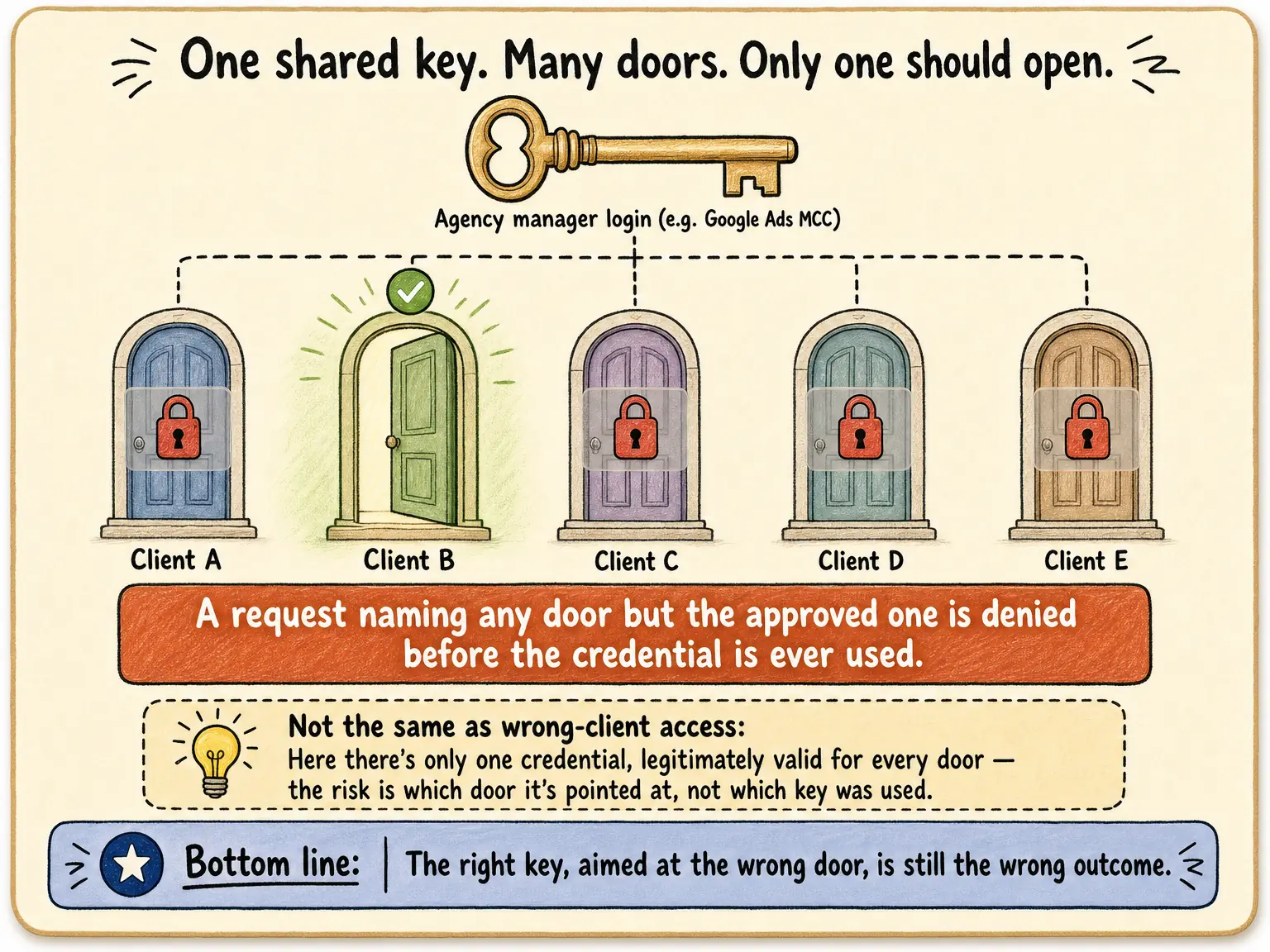
One login can reach many clients. Which resources may this task use?
Last updated:
In short
Outloop is Workspace infrastructure for deploying and operating AI workers.
A valid login proves access to a service, not that a task is working on the correct client resource. Outloop associates approved accounts and resources with the client Workspace. Recorded Google Ads and Meta examples show out-of-scope targets being refused before the requested action is sent.
What does Workspace → client → account → resource mean?
- Workspace: the operating context for the task.
- Client: whose work is being done.
- Account: the approved business account within a service.
- Resource: the specific target, such as an ad account, campaign, property or file location.
These are buyer-facing distinctions. You should be able to identify each one without understanding the internal access implementation.
Why is a shared manager login the clearest example?
An agency’s Google Ads manager login can legitimately reach more than one customer. A task to prepare Client A’s campaign must still use Client A’s approved account. Authentication can succeed while the target is wrong.
Google’s account-management documentation explains the manager/customer distinction. Outloop’s evidence below shows the result of a configured resource boundary.
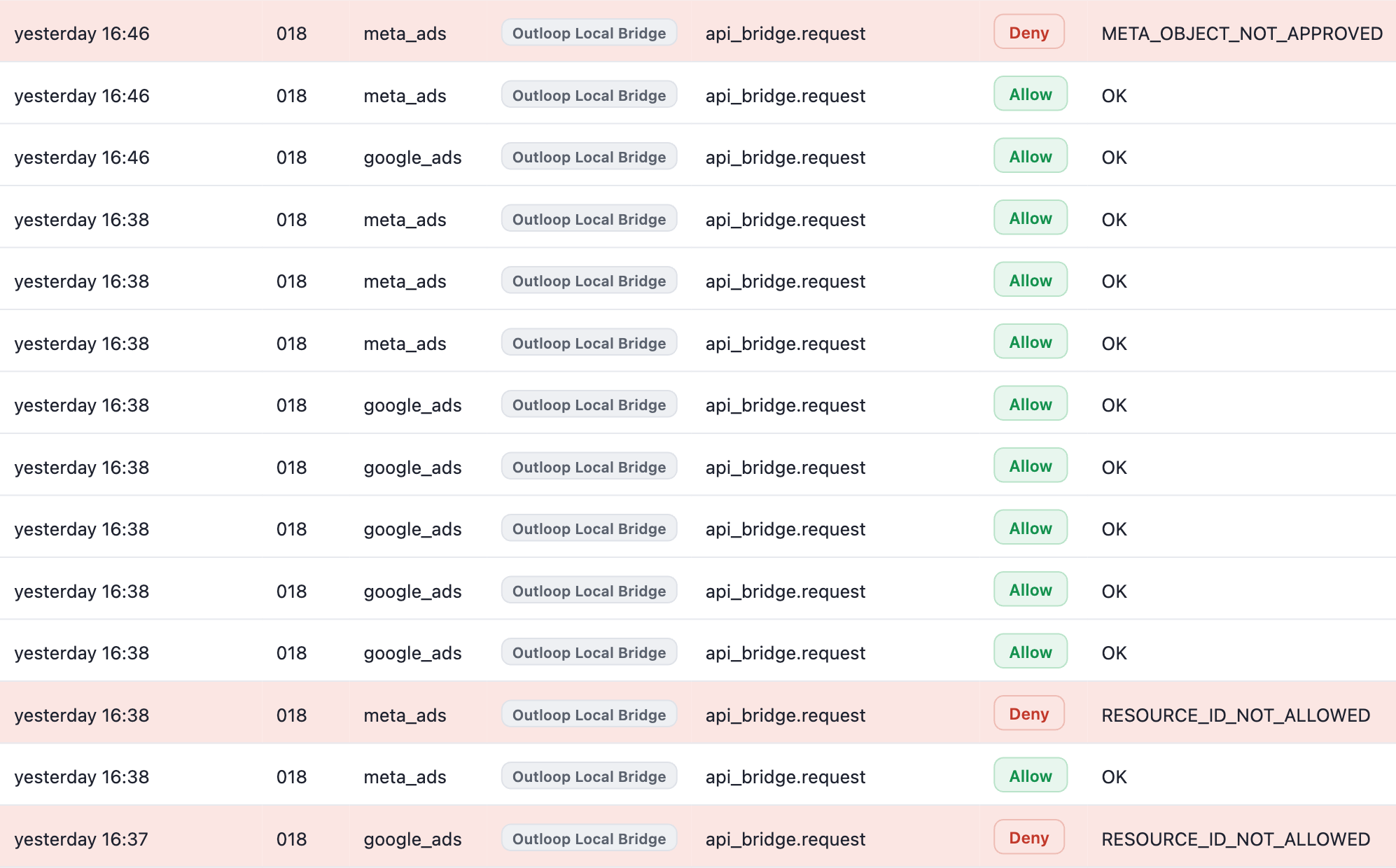
Approved work proceeds. Wrong-resource requests are refused.
Outloop’s Live Activity from one demo workspace running Google Ads and Meta Ads work with approved client access. Approved requests execute; requests for an unapproved resource are refused.
Swipe sideways to read the log · open full size
Refused: these wrong-resource requests did not run
- Deny ·
RESOURCE_ID_NOT_ALLOWED(google_ads and meta_ads) — the request named an account outside this Workspace’s approved resources; the requested action was refused - Deny ·
META_OBJECT_NOT_APPROVED(meta_ads) — a campaign, ad set or ad that does not belong to the approved ad account; the requested action is not sent to Meta - Approved requests in the same workspace keep executing around the refusals — Allow · OK
Real execution in an Outloop demo workspace (workspace 018), published in the September 26, 2026 proof pack — not a customer case study, and not evidence of ad spend, delivery or performance. Enforcement covers requests routed through Outloop. See the runtime access walkthrough for the recorded flow.
What should an operator verify?
- The displayed client, account and resource match the brief.
- The Workspace’s approved resources match what this task needs.
- A safe positive request succeeds and an out-of-scope request is refused.
- Review requirements and output destinations are explicit.
Does this apply identically to every platform?
No. Each service has its own resource types and supported actions. Use the Google Ads, Meta and GTM guides for current setup and proof limits. Do not infer write or publish support from a successful read.
Continue with wrong-client prevention, marketing agency workflows or the current Product overview.
The intended client, approved action and reviewable result
- 01
Client task
Start with the intended client and a defined result.
- 02
Approved Workspace
Use this client’s Context, accounts and resources.
- 03
Supported action
Work through the approved API, browser or file path.
- 04
Reviewable result
Inspect the output and involve a person where required.
- 05
Work history
Keep the work record with the intended Workspace.
Conceptual workflow. Supported actions depend on the configured service, runtime and approved resources.
See the workspace boundary in the request flow.
Watch workspace-scoped access and labeled denial evidence before configuring the account, property or folder for your own integration.
The footage shows particular requests; resource-binding support remains provider-specific.
- Workspace-scoped action requests
- Labeled dashboard views and recorded denials
- Redacted API evidence
Create your trial, then install on your company-controlled Mac. Set up your first workspace.
56 seconds · One request, the right client · No form required
The opening is an architecture illustration. Dashboard views and recorded denials are labeled in the video; API evidence is redacted. Shown campaign execution stays PAUSED.
What Outloop enforces — and where the boundary is
What Outloop enforces
- Keep supported work tied to the configured client accounts and resources.
- Retain approved client Context and reviewable work records.
What it does not guarantee
- Support depends on the service, runtime and configuration.
- Complete session, provider and machine migration is not promised.
What you still configure
- Configure approved accounts, resources and Context separately for each Workspace.
- Validate the client boundary and output before expanding.
Is this for you?
A good fit if…
- You deploy repeatable AI work into real client systems.
- You need separate client context, resources and review.
You may not need Outloop if…
- You need universal model or machine migration today.
- You need automatic deployment cloning or automatic cost routing.