Put an AI worker to work in Webflow.
Use an AI worker for repetitive site and CMS work through approved API access. Use the Webflow UI for visual judgment. Keep important decisions and publication in human hands.
Create your trial, then install on your company-controlled Mac. See plans and pricing.

See the Webflow workflow in 85 seconds.
Watch the worker use approved Webflow API access for structured work, then review native pages and layouts in the browser. Important decisions and publishing stay with the human.
ARGAMAN X MEDIA · Our own agency site
English narration · Original Hebrew site footage
Recorded workflow with unpublished drafts and browser review.
1:25 · A real agency Webflow workflow · No form required · Open video directly
Read the video transcript
Most Webflow work isn't hard. It's repetitive. On our own agency website, I'm using an AI worker through Outloop to work across more than 60 Webflow pages. Through Webflow's API, the worker can inspect the site, pages, and assets, and handle structured jobs like creating and uploading assets without manually clicking through everything. Then, when the work needs eyes, it moves into Webflow itself. It can open the real page, inspect the layout and images, review the work in the browser, and make sure everything looks right before anything gets published. That combination is what makes this useful for an agency. The API handles structured work. Webflow handles the visual layer. And the human stays in control of the important decisions. We're already using this on our own agency site through Outloop. If you work with Webflow agencies, I'd love to show them this workflow. Feel free to share this with the community or connect us.
Download English captionsInspect the page on desktop and mobile.
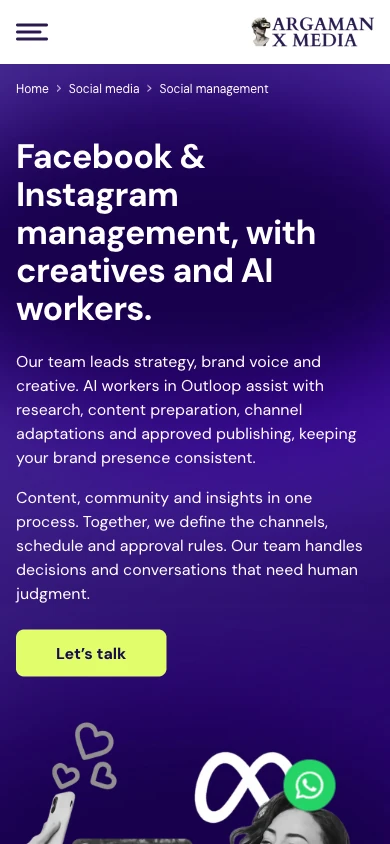
English preview of Webflow staging. Copy translated for this case study. The source site is Hebrew; its production domain had not published this transformation at verification on 21 September 2026.

Structured work through the API.
Visual judgment in the browser.
Webflow API
Fast, structured, repeatable work.
Read page records, compare URL fields, stage CMS updates, work with assets and update supported metadata. Check the returned data after each change.
Webflow UI / browser
Visual inspection and responsive QA.
Edit native content where the UI is needed. Inspect image placement, layout, accordions and the final page at desktop and mobile widths.
Outloop supplies the workspace, Context and approved access. The human sets the goal, reviews important decisions and authorizes publication.
Opening dozens of settings panels by hand makes repetitive checks harder to repeat consistently. The API exposes structured records; the browser reveals the layout, image and interaction issues those records cannot show.
Explore when to use APIs and browsersWhat the worker actually did.
One agency site, with evidence for each kind of work. These are the verified task states—not a claim that every Webflow operation is available.
- Inspect the existing site
Audited 63 existing page records. A fresh comparison found no changes to their slugs, parent paths or published paths.
Verified API read-back - Update structured CMS content
Updated five Services CMS records in staging. Native homepage content was reviewed separately because a CMS update alone did not verify the page binding.
Staged CMS changes - Refresh native pages and links
Updated homepage service copy and destinations, AI-services index copy and links, and the social-management page through the Designer.
Saved / staging - Prepare new service pages
Created AI CRM Automation and AI Marketing Analytics page drafts. The CRM draft received its own metadata; both pages remained unpublished at verification.
Unpublished drafts - Handle real assets
Eight image uploads were recorded as successful, then downloaded again with matching file hashes. Uploading an asset is separate from placing it on a page.
Upload + retrieval verified - Check what visitors will see
Reviewed the social-page staging result at desktop and mobile widths, including content, portfolio behavior and page appearance.
Browser review
A 63-page site.
Its existing URLs kept intact.
ARGAMAN X MEDIA is our own agency. The worker started by inspecting the existing Webflow site and preserving its URL structure, then carried the approved content work into CMS records and native pages.
A fresh API comparison on 21 September found all 63 original slugs, parent paths and published paths unchanged. The inventory had grown to 66 records after adding a collection template and two service-page drafts.
Using both interfaces mattered: updating the Services CMS records did not establish that the homepage was using those fields. The worker checked the actual page, edited its native service content and reviewed the result in the browser.
Keep each client’s website work in its own workspace.
For agencies managing large or CMS-heavy Webflow sites, the repeatable unit is the client workspace: the brief, brand guidance, approved site access and a clear review process.
Client AWorkspace A + client ContextApproved Webflow access A
Client BWorkspace B + client ContextApproved Webflow access B
Reuse the method for content refreshes, internal links, SEO metadata and service-page changes. Confirm the intended site and allowed actions each time; important content, design and publishing decisions stay with the people responsible for that client.
The diagram explains the workspace model. The ARGAMAN example verifies one site, not a cross-client isolation test.
More AI-worker workflows for agenciesFour clear roles. One website workflow.
- Webflow
- The website platform, CMS and APIs.
- AI worker
- Inspects, performs approved tasks and checks the results.
- Outloop
- The correct client workspace, approved Context and runtime access.
- Human
- The goals, important decisions and permission to publish.
Context tells the worker what it should know. Access determines what it may do. See how runtime access works.
Start with one approved Webflow task.
Set up the client workspace, configure the required Webflow access and verify a bounded read before making changes. The general setup guide covers the process; your Webflow operations and browser access must be configured for the intended work.
Webflow and AI agents: common questions.
Can an AI agent work with Webflow?
Yes. An AI worker can use approved Webflow API operations for structured site and CMS tasks, then use an authorized browser for visual inspection. The ARGAMAN X MEDIA example combines a 63-page audit, staged content changes, service-page drafts and desktop/mobile review. Its production publication is a separate decision.
Can an AI agent update Webflow CMS?
Yes, when the account, API permissions and workspace configuration allow the operation. In this case, five existing Services CMS records were updated in staging. CMS records and static Designer pages are different: updating a CMS item does not prove that a particular page is bound to it, and it does not automatically publish the change.
Can AI use the Webflow API?
Yes. The worker can request configured operations to inspect pages and CMS data, update supported fields and work with assets. Outloop performs approved API calls host-side. Available operations depend on Webflow’s API, the account’s permissions and the workspace configuration; an API read does not prove write or publish access.
Can an AI worker use the Webflow Designer or UI?
In this demonstrated workflow, the worker used the Designer to edit native page content and create service drafts, then inspected browser previews at desktop and mobile widths. API work and browser work have separate access requirements. Human review remains important for visual judgment, interactions and publication.
Why use the API instead of clicking through Webflow manually?
The API makes structured work repeatable: list page records, compare URL fields, inspect CMS content and update supported metadata without opening each settings panel. The browser then shows what those changes actually look like. This case verifies the work completed; it does not establish a measured percentage of time saved.
Can an AI worker manage multiple Webflow client sites?
Agencies can organize work in separate Outloop client workspaces, each with its own Context and approved access. Confirm the intended Webflow site and permitted operations for each task. Workspace separation is the operating model; this single-site case is not a cross-client access-control test.
Does the AI worker receive the Webflow API credential?
No. In Outloop’s brokered API flow, the credential is used host-side to perform the approved request. The worker receives the result without being handed the raw API credential. Browser access is configured separately.
What should still require human review?
People set the goals, approve important copy and design decisions, inspect responsive behavior and interactions, and authorize publication. The worker can prepare and check changes, but a saved draft or successful API request is not approval to publish.
How does Outloop work with Webflow?
Webflow supplies the website platform, CMS and APIs. The AI worker performs the task. Outloop supplies the client workspace, approved Context and runtime access. The human owns the brief and important review and publishing decisions. Context informs the work; it does not grant permissions.
Is this Webflow’s own AI or MCP offering?
No. Webflow also provides its own AI and MCP tools. This page demonstrates an external AI worker’s agency workflow through Outloop. It does not imply a Webflow partnership, endorsement or replacement of Webflow.
Put your next Webflow task to work.
Start with one client workspace, an approved brief and a result you can review.
Company-controlled Mac · Guided setup · See plans and pricing